

In flat fee vs per-seat pricing for project management software, the difference is what the bill tracks. Per-seat pricing charges you for every person with a login, every month. A flat fee charges one price no matter how many people use the tool. For one or two people, per-seat is usually cheaper. Past about four users, a flat fee wins, and a one-time license wins by the most. It also stops you rationing logins to keep the bill down.
TL;DR:
- Per-seat pricing scales with your headcount. Flat-fee pricing doesn't, and a one-time purchase stops charging you altogether.
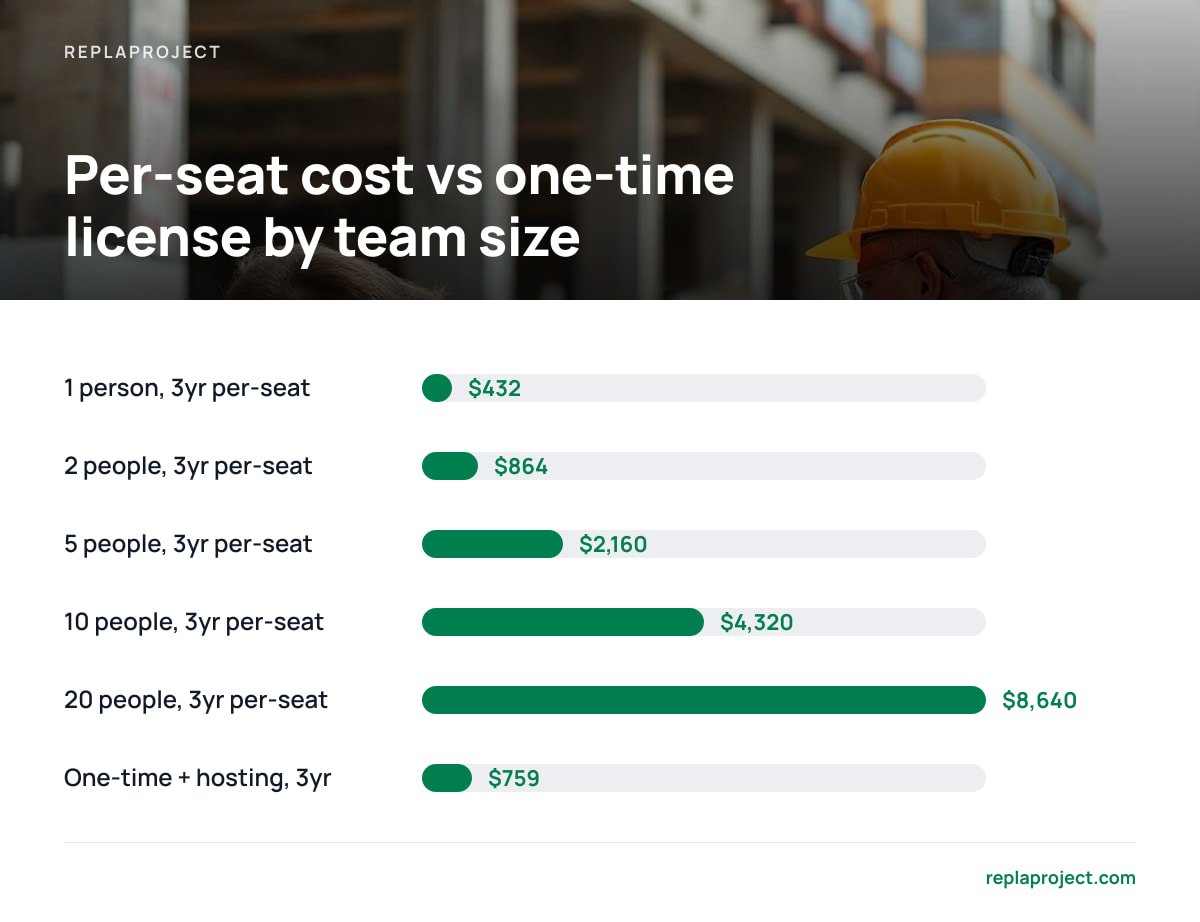
- At an illustrative $12 per user per month, a 10-person team spends $4,320 over three years. A $399 one-time license plus modest hosting comes to about $759.
- For a solo user or a short project, per-seat is often the cheaper and simpler choice.
- The biggest hidden cost of per-seat pricing is rationed logins. Crews share accounts, and information drifts back into text threads.
- A one-time purchase still has real costs: hosting, backups, your time, and a different tax treatment than a subscription.
Table of Contents
- Flat Fee vs Per-Seat Pricing in Project Management: What Each One Actually Charges For
- Every Pricing Model You'll Run Into, and Who Each One Quietly Favors
- The Break-Even Math at 1, 2, 5, 10, and 20 People
- The Cost That Never Shows Up on the Invoice: Rationed Logins
- When Per-Seat Is Actually the Cheaper Pick
- What a One-Time Purchase Really Costs: Hosting, Updates, Backups, and Taxes
- Using the 5 C's of Pricing to Judge a Vendor From the Buyer's Side
- Put Your Whole Crew on One Board for $399, Once
- Frequently Asked Questions
- Sources
Flat Fee vs Per-Seat Pricing in Project Management: What Each One Actually Charges For
SaaS per-seat pricing, also called per-user pricing, is a subscription where the vendor runs the software and charges you a set amount for each named person with an account. The NIST definition of cloud computing (SP 800-145) describes software as a service as applications the provider runs on its own infrastructure, which you use without managing servers. Per-seat is the most common way that arrangement gets billed. Your monthly or annual invoice is the seat price multiplied by your headcount.
A "seat" almost always means a named account, not a person logged in at the same moment. If eight people have logins but only three use the tool on a given day, you still pay for eight. Annual plans usually come with a discount. In exchange, you commit to a seat count for the year.
Flat fee pricing means you pay one price that does not change with the number of users. It comes in two forms, and they get lumped together far too often:
- Flat monthly subscription. You pay one fee each month for the whole team, sometimes with a cap on users and sometimes without. You are still renting the software.
- One-time purchase. You pay once and own a license to that version of the software, often called a perpetual license. Self-hosted tools usually work this way. The bill stops after the first payment.
The distinction matters because a flat subscription only removes the headcount problem. A one-time purchase removes the headcount problem and the recurring bill at the same time.
Every Pricing Model You'll Run Into, and Who Each One Quietly Favors
Most pricing models in project management software are variations on the same handful of approaches. Each one shifts cost risk toward either you or the vendor.
| Model | How you're billed | Best for | Watch out for |
|---|---|---|---|
| Per-seat (per-user) | Fixed price × named users, monthly or annually | Teams of 1–3 with a stable headcount | Cost climbs every time you add a person |
| Tiered per-seat | Per-user price that rises with feature level | Teams that need one specific premium feature | The feature you need sits in a higher tier, so every seat costs more |
| Flat-rate subscription | One monthly fee, users unlimited or capped | Growing teams that want hosting handled | You're still renting, and price increases apply to everyone |
| Usage-based | Charged by projects, storage, or actions | Light, irregular use | Bills are hard to predict in busy months |
| Freemium | Free up to a user or feature limit, then paid | Trying a tool or very small teams | Limits are set to push you onto the paid plan |
| One-time purchase | Pay once and own the license | Stable teams of 4+ planning to stay 2+ years | You handle hosting, backups, and possibly upgrade fees |
| Hybrid | Platform fee plus per-seat or usage charges | Larger organizations | Two moving parts, so costs are hard to compare |
Vendors favor per-seat pricing for a simple reason: their revenue grows with your payroll even if they never ship another feature. That's good for their forecasts. It isn't necessarily bad for you, but it does mean the vendor's incentive is to get more of your people onto paid seats. For a deeper look at tools that skip the headcount charge entirely, see our guide to project management software with no per-user fee.
The Break-Even Math at 1, 2, 5, 10, and 20 People
The break-even point between per-seat and one-time pricing depends almost entirely on team size. The table below assumes $12 per user per month for the per-seat tool, an illustrative mid-range figure for annual plans in this category. It also assumes a $399 one-time license plus $10 a month for a small hosted server. Swap in your own numbers. The shape of the result rarely changes.
| Team size | Per-seat, 1 year | Per-seat, 3 years | One-time + hosting, 3 years | Months to break even |
|---|---|---|---|---|
| 1 | $144 | $432 | $759 | ~200 (realistically never) |
| 2 | $288 | $864 | $759 | ~29 |
| 5 | $720 | $2,160 | $759 | ~8 |
| 10 | $1,440 | $4,320 | $759 | ~4 |
| 20 | $2,880 | $8,640 | $759 | ~2 |
At $12 a seat, a 10-person team pays $4,320 over three years to rent what a $399 license covers once, and the rental bill keeps arriving in year four.
The hosting line is the honest part of the math. If you run a self-hosted tool on a machine your office already owns, that $10 a month drops close to zero and every break-even point arrives sooner. If you pay someone to set up and maintain a server, add their time and the gap narrows.
A flat monthly subscription sits in the middle. At a hypothetical $50 a month for unlimited users, you beat $12 seats once you pass four people. You still pay $1,800 over three years no matter what. If you're weighing the one-time route specifically, our breakdown of one-time purchase project management tools covers what to check before you buy.
The Cost That Never Shows Up on the Invoice: Rationed Logins

The most expensive part of per-seat pricing is the people you leave out to keep the bill down. When every login costs money, owners ration access. The tool then holds only part of the picture, which defeats the reason you bought it.
- The crew lead shares a login. One account gets passed around a site crew. Nobody can tell who updated what, and the password ends up written on a whiteboard.
- Subcontractors live in text threads. They don't get seats, so their updates arrive by phone or text. Someone in the office has to retype those updates into the system, if they get entered at all.
- The office manager becomes a human relay. One person with a seat answers "what's the status on the Miller job?" a dozen times a day, because everyone else can't check for themselves.
- Guest access turns into paid seats. Some vendors offer free guest or viewer accounts, then require a paid seat once that person needs to edit or comment. Read the fine print on what a guest can actually do.
- Seats outlive the people. Former employees and one-off contractors keep their paid accounts until someone remembers to remove them. On annual plans, you may not get that money back until renewal.
Pro Tip: Before you compare prices, write down every person who should be in the tool but isn't. Include crew leads, subcontractors, and the bookkeeper who keeps asking for job status. Price per-seat options at that number, not your current seat count. Many annual per-seat contracts let you add seats mid-term but only reduce them at renewal, so check yours before you commit.
When Per-Seat Is Actually the Cheaper Pick

The easy conclusion, that a flat fee always wins, is wrong in a few specific situations. If any of these describe you, per-seat may be the better buy:
- You work alone. One seat at $10–$15 a month takes well over a decade to cost more than a one-time license plus hosting. Per-seat wins.
- The project has an end date. A six-month renovation project with three people costs a few hundred dollars on per-seat pricing. When the project ends, you cancel.
- Nobody will look after a server. A self-hosted tool needs someone to apply updates and confirm backups ran. If that person doesn't exist, the vendor's operations team is worth paying for.
- Your headcount is shrinking. Per-seat costs fall when people leave. A one-time purchase is a sunk cost either way.
- A client requires specific certifications. Some contracts require a hosted vendor with particular compliance attestations. Self-hosting shifts that responsibility onto you.
Here's the position, stated plainly. If you have four or more people and expect to use the tool for two years or more, buy a one-time license. If you have one or two people, or the work ends in under a year, rent per-seat and don't feel bad about it.
What a One-Time Purchase Really Costs: Hosting, Updates, Backups, and Taxes
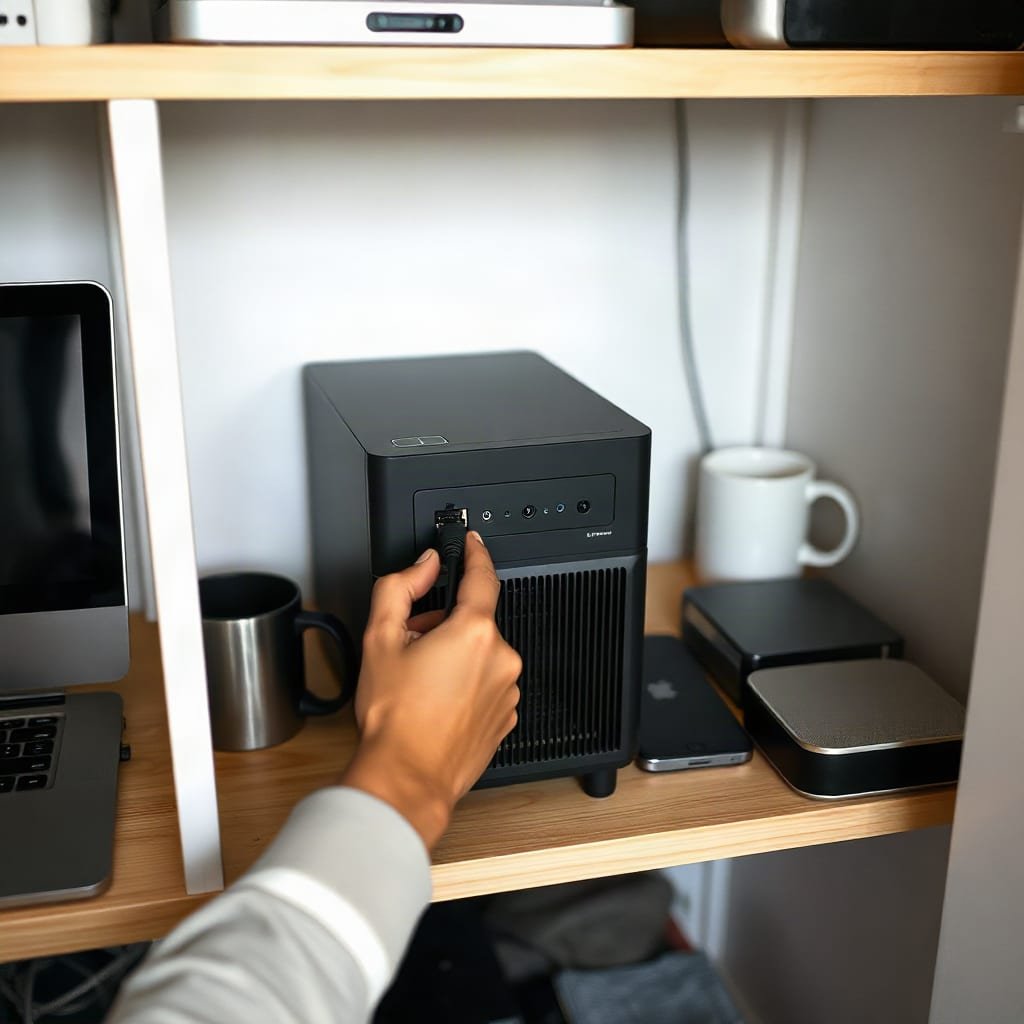
A one-time purchase removes the monthly bill, but it doesn't remove every cost. Plan for these four before you switch.
Hosting
A self-hosted tool needs somewhere to run. That can be an existing office PC, a small network storage box, or an inexpensive cloud server. Expect anywhere from nothing to a modest monthly fee. Ask the vendor for minimum hardware requirements before you buy.
Updates
"One-time" describes the purchase, not the support. Check whether future versions are included, whether security fixes are guaranteed for a set period, and what a major upgrade costs if one isn't included. Our explainer on one-time purchase software covers what you actually own once you've paid.
Backups
When you host the tool yourself, you're responsible for the data. CISA's #StopRansomware Guide recommends keeping offline, encrypted backups of critical data and testing that you can restore them. A job board holding a year of customer work deserves the same treatment.
Taxes
Subscriptions and one-time licenses are usually handled differently on your books. In the US, IRS Publication 946 explains that off-the-shelf computer software can be depreciated over 36 months and may qualify for the Section 179 deduction. A subscription is generally treated as an ordinary operating expense. Rules differ by country, so ask your accountant which treatment suits your year.
Using the 5 C's of Pricing to Judge a Vendor From the Buyer's Side
The 5 C's of pricing are the five factors marketers use to set a price: Costs, Customers, Competition, Channels, and Compatibility with the company's goals. The framework is written for sellers. Turned around, it's a quick way to work out why a vendor charges what it charges.
- Costs. Hosting the software costs the vendor money every month, which partly explains recurring fees. A self-hosted tool moves that cost to you, which is why it can be sold once.
- Customers. Per-seat pricing targets buyers who will add people over time. If you're a growing trades business, you are exactly the customer that model profits from.
- Competition. When rival tools all charge per seat, a vendor has little reason to price any other way. Different pricing models usually come from smaller vendors trying to stand out.
- Channels. Software sold through app marketplaces or resellers often carries a markup somewhere in the price. Buying direct can remove it.
- Compatibility. The price reflects the vendor's goals. A company focused on recurring revenue will steer you to annual seats. A company selling licenses wants you to buy once and recommend it to others.
Running a vendor through these five questions takes about five minutes. It tells you whether the pricing model fits how your business actually grows.
Put Your Whole Crew on One Board for $399, Once
ReplaProject is a self-hosted project management tool you buy once for $399, with no per-seat charge. Add the crew leads, the subcontractors, and the bookkeeper, and the price stays the same. Every job appears in board, table, and calendar views. Forward an email and it becomes a job. A public intake form turns customer requests into jobs without anyone retyping them. Automatic dependency detection shows what's holding each job up. An optional AI assistant suggests jobs, and a person approves each one before it's added.
The honest caveat: self-hosted means you're the operations team. You'll need a machine to run it on and a backup routine you've actually tested. Before you buy, read the spec sheet, including ours, to confirm the hardware requirements and what the update policy covers. If you're a solo operator, the math above says per-seat may still suit you better.
Frequently Asked Questions
What does flat fee pricing mean?
Flat fee pricing means you pay one set price that doesn't change with the number of people using the software. It comes either as a flat monthly subscription or as a one-time purchase you pay once. Only the one-time version removes the recurring bill.
What is SaaS per seat pricing?
SaaS per-seat pricing is a subscription where the vendor hosts the software and charges a fixed amount for each named user, monthly or annually. A seat is a named account, not a concurrent login, so every person with access counts. Your bill rises each time you add someone.
What are the different types of pricing models?
The common software pricing models are per-seat, tiered per-seat, flat-rate subscription, usage-based, freemium, one-time purchase, and hybrids that combine two of these. Each one shifts cost risk differently between you and the vendor. Per-seat suits very small teams, while flat and one-time models suit teams that are growing.
What are the 5 C's of pricing?
The 5 C's of pricing are Costs, Customers, Competition, Channels, and Compatibility with the company's goals. Sellers use them to set prices. Buyers can use the same five questions to understand why a vendor charges per seat or per license.
At what team size does flat-fee project management software become cheaper than per-seat?
At roughly $12 per user per month, a $399 one-time license plus $10 a month in hosting breaks even in about eight months for five people and about four months for ten. For two people it takes over two years. For one person, per-seat is usually cheaper indefinitely.
Is a one-time purchase really free after you pay?
Not entirely, because a self-hosted tool still needs hosting, tested backups, and someone to apply updates. You should also check whether future major versions cost extra. Those costs are usually small next to recurring per-seat fees for a team of four or more.
Sources
- The NIST Definition of Cloud Computing (SP 800-145) | National Institute of Standards and Technology
- Publication 946: How To Depreciate Property | Internal Revenue Service
- #StopRansomware Guide | Cybersecurity and Infrastructure Security Agency