

Lifetime license project management software lets you pay once instead of paying per seat every month. The catch is that "lifetime" can mean three different things: a perpetual license you install yourself, a hosted "lifetime deal" that lasts only as long as the vendor does, or a license that never expires but stops getting updates after a year. Only the first one is something you actually own. For a team of five or more, a self-hosted perpetual license usually pays for itself within months.
TL;DR:
- "Lifetime" usually means one of three deals: a self-hosted perpetual license, a hosted lifetime deal, or a perpetual license with time-limited updates. Only the first survives the vendor.
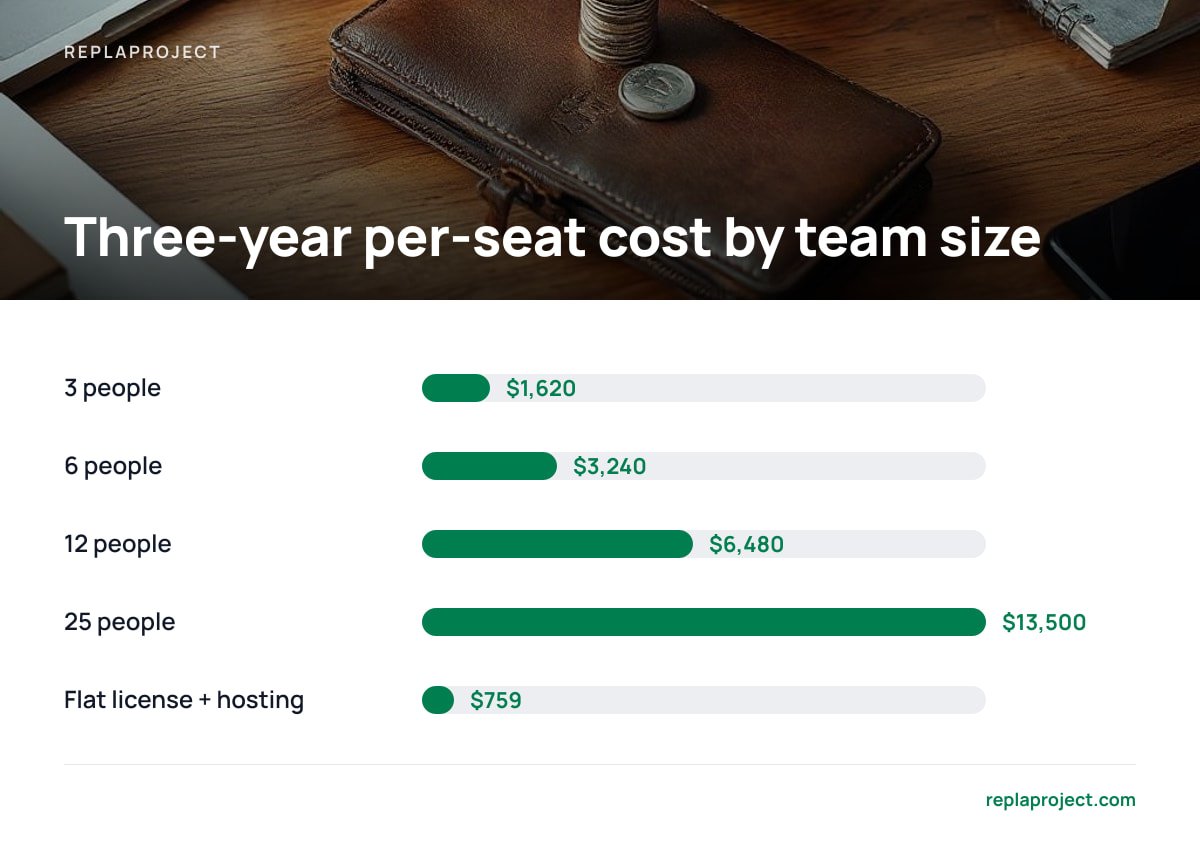
- A 12-person team at $15 per seat per month spends $6,480 over three years. A flat $399 license plus about $10 a month for hosting costs under $800.
- Hosted lifetime deals are the riskiest version, because the vendor keeps paying server costs that your one payment no longer covers.
- Self-hosting moves the patching, backups, and HTTPS setup onto you. Budget an hour a month, or pay someone to handle it.
- Before you buy, read the license for four things: seat limits, what counts as a "major version," whether you can transfer the license, and termination terms.
Table of Contents
- "Lifetime" Means Three Different Things, and Only One Is Ownership
- The Real Math: Lifetime License Project Management Software vs. Per-Seat Bills
- Hosted Lifetime Deals: Why the Cheapest Ones Carry the Most Risk
- What a Self-Hosted License Asks of You: Patching, Backups, and HTTPS
- Read the License Before You Pay: The Clauses That Decide What "Lifetime" Means
- Which Option We'd Pick, and When Per-Seat Still Wins
- Add Your Whole Crew for $399 and Never Count Seats Again
- Frequently Asked Questions
- Sources
"Lifetime" Means Three Different Things, and Only One Is Ownership
Vendors use the word "lifetime" loosely, and the differences decide whether your one payment is a purchase or a prepayment. Before you compare features or prices, work out which of these three deals you're actually looking at.
- Self-hosted perpetual license. You pay once and get the software, and it runs on a server you control. If the vendor folds tomorrow, your copy keeps running. This is the only version where "lifetime" means the lifetime of your use, not theirs.
- Hosted lifetime deal. You pay once, and the vendor hosts the software for you indefinitely. "Indefinitely" here means as long as the vendor stays in business, keeps the product, and honors the deal. Your access depends entirely on their servers.
- Perpetual license with expiring updates. The software never stops working, but bug fixes and new features end after 12 months unless you pay a renewal. This is common and fair, as long as you know it going in.
A self-hosted perpetual license also has a quiet advantage that's easy to miss: nobody can change the price on you. A hosted vendor can raise prices, cut a plan, or move a feature you rely on into a higher tier. A copy running on your own server is exactly what you paid for, and it stays that way until you choose to upgrade.
If you're new to the category, our overview of one-time purchase project management tools covers the wider market. This guide focuses on the license itself and what it does and doesn't guarantee.
The Real Math: Lifetime License Project Management Software vs. Per-Seat Bills

Per-seat pricing looks cheap when you sign up with three people. It gets expensive once you add the office manager, two site leads, and the subcontractor who needs to see one board. Per-seat project management plans commonly run somewhere between $10 and $25 per user per month. The table below uses $15 as a middle figure.
| Team size | Per-seat at $15/user/month, 3 years | Flat $399 license + ~$10/month hosting, 3 years | Difference |
|---|---|---|---|
| 3 people | $1,620 | $759 | $861 |
| 6 people | $3,240 | $759 | $2,481 |
| 12 people | $6,480 | $759 | $5,721 |
| 25 people | $13,500 | $759 | $12,741 |
The flat-fee column doesn't move as you hire. That's the whole point. The per-seat column punishes you for adding the people who would benefit most from seeing the schedule, such as the part-timer, the client contact, or the second crew.
12 people at $15 a seat is $6,480 over three years. That's more than 16 copies of a $399 license.
To be fair to subscriptions, the table leaves out two costs on the self-hosted side. One is your time spent on upkeep, covered below. The other is any paid upgrade when a new major version ships. Even if you add a full second license fee for an upgrade in year three, the flat option still wins for any team above about three people.
Tax treatment is rarely the deciding factor, though it's worth knowing. In the US, IRS Publication 946 lists off-the-shelf computer software as eligible for the Section 179 deduction. That means a one-time purchase can often be expensed in the year you buy it, much like subscription fees. Rules differ by country, so ask your accountant rather than letting the tax angle drive the choice.
Hosted Lifetime Deals: Why the Cheapest Ones Carry the Most Risk
A hosted lifetime deal asks you to believe something odd. A company will run servers, pay for storage, answer support tickets, and patch security holes for you, forever, in exchange for a single payment made years ago. Sometimes that works. Often the vendor sold the deal to raise quick cash, and the math stops working once those early buyers start using the product heavily.
The usual failure modes are predictable:
- The plan gets "retired." Lifetime buyers are moved to a limited legacy tier, and new features go to paying subscribers only.
- Usage caps appear. Storage, projects, or users get capped, and anything above the cap costs a monthly fee.
- The product shuts down. You get an export file and a polite email. Your board, comments, and history become a spreadsheet.
None of this is illegal if the terms allow it, and they usually do. The license protects the vendor's ability to change the service, not your expectations.
Our position: if you want to stop paying monthly, buy a license you can run yourself. A hosted lifetime deal is a subscription the vendor has stopped charging you for, and they can stop honoring it the same way. If you want hosted convenience, pay a fair monthly price to a vendor whose business model actually depends on keeping you. Our breakdown of project management with no per-user fee covers hosted options that charge a flat monthly rate instead of per seat.
What a Self-Hosted License Asks of You: Patching, Backups, and HTTPS

Owning the software means owning the chores that come with it. These chores are small, but they aren't optional, and skipping them is how a cheap tool turns into an expensive incident.
Keep it patched
Software ships with bugs, and some of those bugs are security holes. The US Cybersecurity and Infrastructure Security Agency keeps a Known Exploited Vulnerabilities catalog because attackers routinely go after flaws that already have patches available. For your project tool, keeping it patched means two things. Install vendor updates when they ship, and keep the underlying operating system and database updated too. Most small-business breaches don't involve anything clever. They involve something nobody updated.
Back it up somewhere else
A backup stored on the same server isn't a backup. Use the common 3-2-1 approach: keep three copies of your data, on two different types of storage, with one copy kept off-site. If you store customer names, addresses, or job details, and a trades business almost certainly does, data protection law may also apply to you. Under the EU's General Data Protection Regulation, Article 32 expects you to be able to restore availability of and access to personal data promptly after an incident. A tested restore is how you meet that expectation in practice.
Put it behind HTTPS
Your team will log in from job sites, phones, and coffee-shop Wi-Fi, so the connection needs to be encrypted. Let's Encrypt issues free, automated TLS certificates, and most reverse-proxy setups can renew them without anyone touching anything.
Pro Tip: Before you buy, ask the vendor whether the license allows a second install for staging or disaster recovery. Many licenses are tied to a single server or domain. If yours is, then restoring a backup onto a new machine after a hardware failure could technically breach the license. Get the answer in writing, and run your first upgrade on a copy of the server before you run it on the real one.
If none of this sounds like something you want to do, budget a few hours a year for a local IT contractor. That cost is still a rounding error next to the per-seat column in the table above. For a broader look at the self-hosted market, see our guide to self-hosted task management, open source or not.
Read the License Before You Pay: The Clauses That Decide What "Lifetime" Means
The marketing page tells you what the vendor hopes you'll assume. The license tells you what you actually get. Search the license text for these terms before you pay:
- "Seat," "user," or "named user." Check whether "unlimited" really means unlimited, or unlimited up to a cap mentioned later in the terms.
- "Major version." Many perpetual licenses cover updates within one major version only. Under Semantic Versioning, going from 2.x to 3.0 signals breaking changes, and that's the point where vendors tend to start charging again.
- "Updates" and "support." Find out whether these come with the license for life or for a fixed period, and what a renewal costs after that.
- "Transfer." Check whether you can move the license to a new server, a new domain, or a new owner if you sell the business.
- "Terminate." Read the conditions under which the vendor can revoke your license, and make sure they're limited to things like non-payment or breach.
- "Phone home" or "activation." If the software checks a license server at startup, find out what happens when that server goes away. A self-hosted tool that stops working when the vendor's activation server goes down isn't really yours.
- "Export." Confirm you can get all of your data out in an open format such as CSV or JSON, including comments and attachments, not just task titles.
If a self-hosted tool needs the vendor's server to start up, you've bought a subscription with extra steps.
Which Option We'd Pick, and When Per-Seat Still Wins
If you run a team of five or more, mostly work out of one office or yard, and have someone who can follow setup instructions (or a contractor who can), buy a self-hosted perpetual license. The savings are large, they grow every time you hire, and you stop arguing about whether the apprentice "really needs" a login.
Per-seat subscriptions still make sense in a few cases:
- Two or three users who will never grow. At that size, the yearly difference is small, and fully managed hosting is worth paying for.
- No one to own the server. Some teams have no technical person and no budget for a contractor. Unpatched self-hosted software is worse than a subscription.
- You need a specific integration that only one hosted product offers. In that case, buy the integration and accept the bill.
Everyone else is renting something they could own. For more on the buying decision, including what to check in a demo, see our guide on project management software with a one-time payment.
Add Your Whole Crew for $399 and Never Count Seats Again

ReplaProject is a self-hosted, one-time-purchase project management tool. You pay $399 once, and you can add as many people as you like. Every job across every project appears in board, table, and calendar views. You can forward an email and it becomes a job, and customers can submit requests through a public intake form instead of texting your foreman. Dependency detection runs automatically and shows you what's holding a job up before the crew turns up to find out. There's also an AI assistant that suggests jobs, and nothing it suggests goes live until a person approves it.
The honest caveat: ReplaProject runs on your server, so the patching, backups, and HTTPS covered above are your job or your IT contractor's. Read our license terms on updates and major versions as carefully as you'd read anyone else's. If you'd rather never think about a server, a hosted subscription may suit you better.
Frequently Asked Questions
Is lifetime license project management software actually cheaper than a subscription?
For most teams of four or more, yes. A 12-person team paying $15 per seat each month spends $6,480 over three years, while a $399 license plus modest hosting comes to under $800. The gap grows every time you add a person.
What happens to a lifetime license if the vendor goes out of business?
It depends on the type of license. A self-hosted perpetual license keeps running on your server, unless it requires activation from the vendor's servers. A hosted lifetime deal usually ends when the vendor's service shuts down, often with only a data export offered.
Do lifetime licenses include future updates?
Often only for a set period, or only within one major version. Many vendors charge again when a new major version ships, which under Semantic Versioning means a jump like 2.x to 3.0. Check the license for the words "updates," "support," and "major version" before you buy.
Do I need technical skills to run self-hosted project management software?
You need enough to install updates, schedule off-site backups, and set up HTTPS, or a contractor who can do it for a few hours a year. Free tools like Let's Encrypt handle certificates automatically. If nobody can take on this work, a hosted subscription is the safer choice.
Can I deduct a one-time software purchase as a business expense?
In the US, IRS Publication 946 lists off-the-shelf computer software as eligible for the Section 179 deduction, so it can often be expensed in the year you buy it. Rules vary by country and by business. Confirm with your accountant.
Sources
- Publication 946, How to Depreciate Property | Internal Revenue Service
- Known Exploited Vulnerabilities Catalog | Cybersecurity and Infrastructure Security Agency
- Regulation (EU) 2016/679 (General Data Protection Regulation) | EUR-Lex, European Union
- Semantic Versioning 2.0.0 | semver.org
- Let's Encrypt | Internet Security Research Group