

Project management software with no per-user fee comes in two real forms. The first is a flat-rate subscription, where you still pay every month but the bill doesn't grow with headcount. The second is a one-time purchase, usually self-hosted, where you pay once and add as many people as you like. The flat subscription keeps the vendor in charge of your costs. The one-time license puts you in charge, and in exchange you look after the server.
TL;DR:
- "No per-user fee" means either a flat-rate subscription or a one-time license. Only the second stops recurring costs.
- At around $12 per user per month, a 15-person team spends about $6,480 over three years on per-seat software.
- Many "unlimited users" plans cap guests, storage, or automations. Read the limits page, not the pricing headline.
- Self-hosting is a real job: backups, updates, and patching. It's small, but it's yours.
- For small trades and office teams with growing or seasonal headcount, a one-time-purchase self-hosted tool usually wins on cost and control.
Table of Contents
- Why Per-Seat Pricing Punishes Exactly the Teams That Need It Most
- The Five Ways to Get Project Management Software With No Per-User Fee
- The Three-Year Math: Per-Seat Versus Paying Once
- The Catches Nobody Puts on the Pricing Page
- Self-Hosting Without Regret: What You're Actually Signing Up For
- What to Check Before You Pay Once
- Which Option We'd Pick, and When We Wouldn't
- Get Unlimited Users for One $399 Payment, and Keep Your Data
- Frequently Asked Questions
- Sources
Why Per-Seat Pricing Punishes Exactly the Teams That Need It Most

Per-user pricing works fine for a ten-person software company where everyone sits at a desk all day. It works badly for a plumbing outfit with four office staff, eleven techs, and three subcontractors who show up for six weeks every spring. Each of those people needs to see their jobs. Each of them costs you a seat.
The result is predictable. Owners ration access. The office gets logins, and the crew gets updates by text message, phone call, or a whiteboard photo. The software is supposed to be the single source of truth, but half the people doing the work never look at it. You're paying for a project tool and running the business on group chats anyway.
Per-seat pricing also turns every hiring decision into a software decision. Bring on a seasonal helper and your monthly bill goes up. Give a client's site manager visibility and you're either buying another seat or hunting through the plan tiers to see whether "guests" count. None of that has anything to do with managing projects.
The Five Ways to Get Project Management Software With No Per-User Fee
"No per-user fee" covers several very different arrangements. They solve the headcount problem in different ways, and each comes with a different catch.
| Model | What you pay | Adding a person costs | Who runs the server | The catch |
|---|---|---|---|---|
| Per-seat subscription (the baseline) | Monthly, per user | Another seat, every month | Vendor | Bill scales with headcount forever |
| Flat-rate subscription | Fixed monthly or annual fee | Nothing, up to a cap or tier | Vendor | Price set by vendor; often has user or feature ceilings |
| Free tier with user cap | $0 | Upgrade once you pass the cap | Vendor | Caps are often 5–10 users; key features held back |
| Open-source, self-hosted | $0 license | Nothing | You | Setup, maintenance, and often a rough interface |
| One-time purchase, self-hosted | Single license fee | Nothing | You | You own updates and backups |
The first three rows keep you renting. The last two make you an owner. That's the real dividing line, and it matters more than the price on day one.
If you're seriously considering the open-source route, we've done the real math on open-source, self-hosted project management. The short version is that "free" software isn't free once you count the hours someone spends getting it to behave.
The Three-Year Math: Per-Seat Versus Paying Once

Software bills feel small monthly and look large annually. Over three years, a realistic lifespan for a tool you adopt properly, the gap gets hard to ignore.
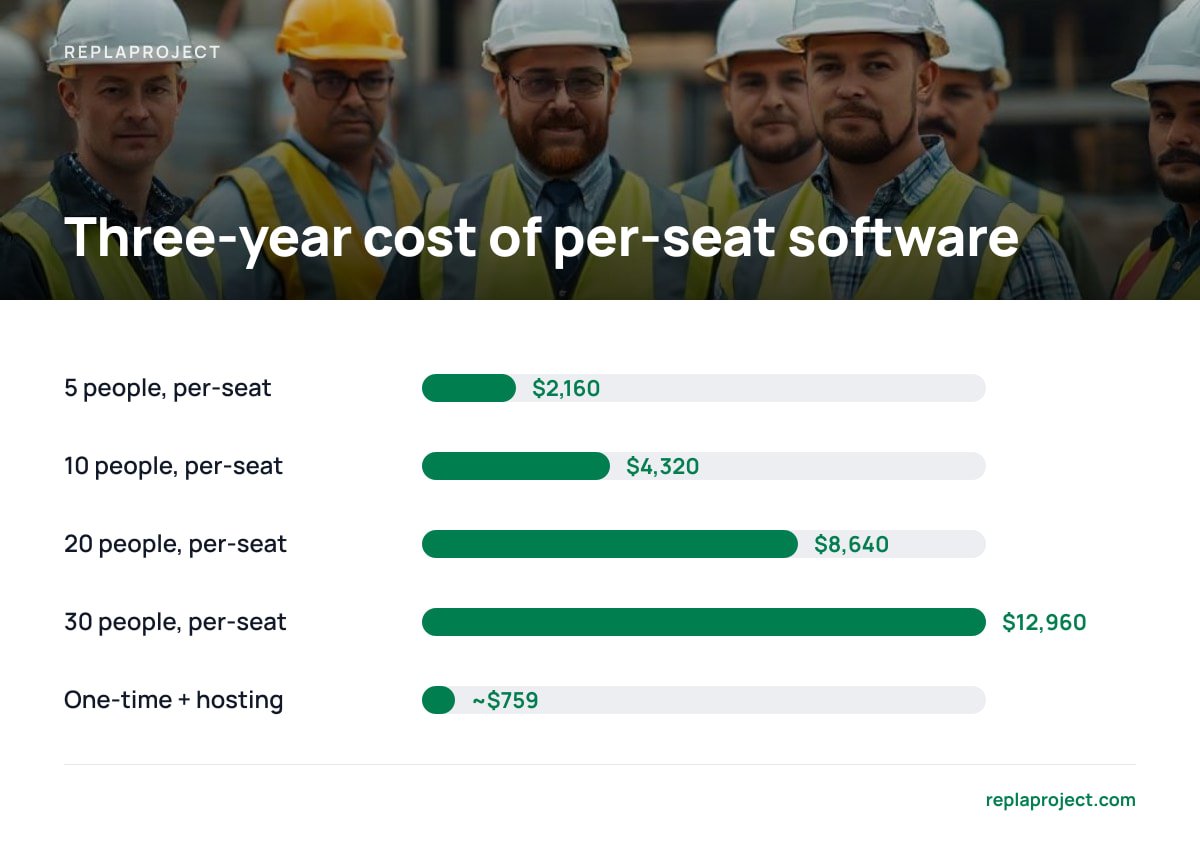
The table below assumes a per-seat plan at $12 per user per month, which is a fair middle estimate for mainstream business tiers. It compares that to a $399 one-time license plus roughly $10 per month for a small cloud server to host it.
| Team size | Per-seat, per year | Per-seat, 3 years | One-time + hosting, 3 years |
|---|---|---|---|
| 5 people | $720 | $2,160 | ~$759 |
| 10 people | $1,440 | $4,320 | ~$759 |
| 20 people | $2,880 | $8,640 | ~$759 |
| 30 people | $4,320 | $12,960 | ~$759 |
Notice the last column doesn't move. Headcount stops being a cost driver.
At $12 per user per month, a 15-person crew pays $2,160 every year. A $399 license costs about what that crew's subscription runs in 67 days.
There's a tax angle too, at least in the United States. The IRS guidance in Publication 946 treats off-the-shelf computer software as property that can qualify for the Section 179 deduction, or else be depreciated over 36 months. A subscription is just an operating expense. Which treatment suits you depends on your situation, so ask your accountant before you count on either.
The Catches Nobody Puts on the Pricing Page
"Unlimited users" is a headline, not a contract. Before you trust it, check the fine print for these.
Guest and external user limits
Some flat-rate plans let you add unlimited members but cap or charge for guests. Guests are often exactly the people trades businesses need: clients, subcontractors, and site supervisors. If your crew counts as guests, your "unlimited" plan may not be.
Feature gating by tier
Automations, dependencies, and integrations. Many vendors put these behind higher tiers. The plan with no seat limit can turn out to be the one with no dependency tracking, which is the feature that tells you why a job is stuck.
Storage and history caps
File limits. Job photos, quotes, and signed change orders pile up fast. A plan with a small storage ceiling just moves your per-user fee into a per-gigabyte fee.
Price changes you didn't agree to
Renewal terms. A flat subscription is flat until renewal. Then it's whatever the vendor decides. A one-time license is the only arrangement where the price you paid stays the price you paid.
Update and support terms on one-time licenses
What "lifetime" covers. Even one-time purchases vary. Some include updates for a year, some indefinitely, and some sell major versions separately. Get the answer in writing before you pay.
Pro Tip: Before comparing plans, list everyone who would use the tool if access were free. That means the techs getting updates by text, the bookkeeper who asks "is that job done?", and the subcontractor lead. Most owners undercount by a third or more. Price every option against that real number, not your current seat count, because the current count already reflects years of rationing.
Self-Hosting Without Regret: What You're Actually Signing Up For

Self-hosting sounds scarier than it is, but it isn't nothing. When you run the software, three jobs that a vendor used to handle become yours.
- Backups. The UK National Cyber Security Centre's Small Business Guide puts backing up your data first on its list. It recommends keeping backups separate from the main system and testing that you can actually restore them. A nightly automated snapshot from your hosting provider covers most of this.
- Updates. The same guide tells small businesses to keep software and devices updated. For a self-hosted tool, that means applying vendor releases when they ship, not six months later.
- Patching the server underneath. Your project tool runs on an operating system and a web server, and those need patches too. CISA's Known Exploited Vulnerabilities Catalog is a running list of flaws attackers are actively using. It's a good reminder that unpatched servers are a target, not a theory.
- Basic web security. If your instance faces the internet, the OWASP Top Ten is the standard reference for the most common web application risks. You don't need to master it. You do need HTTPS, strong passwords, and a vendor that takes it seriously.
Self-hosting adds about an hour a month of real work for a small team: check the backup, apply the update, glance at the server. That hour replaces a bill that grows every time you hire.
If nobody on your team will do that hour, a managed host or your IT contractor can do it for a small fee. That's still almost always cheaper than per-seat pricing past about eight people. For more on the trade-offs, see our guide to self-hosted task management, open source or not.
What to Check Before You Pay Once
A one-time purchase is a commitment, so check the tool against how your business actually runs. These are the features that matter for small trades and office teams.
- Multiple views of the same jobs. The office wants a table, the crew lead wants a board, and the owner wants a calendar. If switching views means switching tools, people will stop switching.
- Email-to-task intake. Most work in a small business arrives by email. If you can forward a message and get a job, the tool fits your day. If you have to retype everything, nobody will. Our breakdown of software that turns customer requests into jobs covers this in detail.
- A public intake form. Customers submitting requests directly cuts out a whole round of phone tag.
- Dependency tracking. "Waiting on the electrician" should show up as a blocker on the job, not live in someone's head.
- Export. You own the license, so make sure you can get your data out in a standard format like CSV.
- A clear update policy. Ask how updates are delivered and how long they're included.
If you want a fuller checklist of what a job tool has to do, start with job tracking software: what it actually needs to do.
Which Option We'd Pick, and When We Wouldn't
Here's our position. For a small business with more than about six people, or with headcount that swings by season, a one-time-purchase, self-hosted tool is the right call. It's the only model where adding a person is free, the price never changes on you, and your job data sits on a server you control.
We'd pick a flat-rate subscription instead in one situation: nobody on the team, and no contractor you trust, will handle backups and updates. Paying someone else to worry about servers is a legitimate purchase. Just read the guest and renewal terms first.
We'd skip free tiers for anything beyond a trial. A five-user cap is a demo, not a plan. And we'd only choose open source if you have someone technical who enjoys that sort of thing. The license is free, but the evenings spent configuring it are not.
Get Unlimited Users for One $399 Payment, and Keep Your Data
ReplaProject is a self-hosted project management tool you buy once for $399 flat, then add as many people as you need. Every job across every project appears in board, table, and calendar views. You can forward an email to turn it into a job, and a public intake form lets customers submit requests directly. Dependencies are detected automatically, so you can see what's holding a job up without asking around. An optional AI assistant, which also runs as an MCP server, suggests new jobs, and a person approves each one before it goes in.
The honest caveat: because you host it, backups and updates are your job, or your IT contractor's. Everything in the self-hosting section above applies to us too. Before you buy, read the feature list against your must-haves, including whether you need anything outside project tracking, such as invoicing.
Frequently Asked Questions
Is there project management software with no per-user fee?
Yes. You'll find it in two forms: flat-rate subscriptions, which charge a fixed monthly fee regardless of headcount, and one-time-purchase tools, usually self-hosted, which you pay for once. Only the one-time model removes recurring costs entirely.
Are "unlimited users" plans really unlimited?
Often not completely. Many cap or charge separately for guest users, hold back features like automations or dependencies for higher tiers, or limit storage. Check the plan's limits page for guest rules and feature lists before signing up.
How much can a small team save by avoiding per-seat pricing?
At a typical $12 per user per month, a 10-person team spends about $4,320 over three years. A $399 one-time license plus roughly $10 a month for hosting comes to around $759 over the same period, and that figure stays the same as the team grows.
Is self-hosting project management software hard?
For a small team, it's usually about an hour a month: confirm backups ran, apply updates, and keep the server patched. If nobody in-house will do it, a managed host or IT contractor can handle it for a modest fee.
Can I deduct one-time software purchases on my taxes?
In the U.S., IRS Publication 946 says off-the-shelf computer software can qualify for the Section 179 deduction or be depreciated over 36 months. Rules depend on your business, so confirm with your accountant.
Sources
- Publication 946, How To Depreciate Property | Internal Revenue Service
- Small Business Guide: Cyber Security | National Cyber Security Centre
- Known Exploited Vulnerabilities Catalog | Cybersecurity and Infrastructure Security Agency
- OWASP Top Ten | OWASP Foundation