

A one-time purchase project management tool charges you once for a license instead of billing every user every month. The distinction that matters most is where it runs. A self-hosted tool keeps working on your own server even if the vendor disappears. A "lifetime deal" on someone else's cloud lasts only as long as that company stays in business and honors the deal. For a crew that keeps adding people, a self-hosted flat-fee tool usually costs less than a per-seat subscription by the end of year two.
TL;DR:
- Per-seat pricing punishes growth: in our illustrative math, 25 people at $12 a seat cost $18,000 over five years, against roughly $1,000 for a flat license plus modest hosting.
- "One-time purchase" covers two different products: self-hosted software you control, and cloud "lifetime deals" that depend on the vendor surviving.
- Self-hosting moves patching, backups, and uptime onto you. Budget an hour or two a month, or pay someone who knows servers.
- For trades and small offices, the features that matter are unlimited users, request intake, dependency tracking, and a calendar view the whole crew can read.
- Before you buy, ask about update terms, data export formats, and what happens to your license if the vendor changes hands.
Table of Contents
- What a One-Time Purchase Actually Buys You, and What It Doesn't
- The Math: Per-Seat Subscriptions vs. a Flat Fee Over Five Years
- Choosing a One-Time Purchase Project Management Tool: Self-Hosted or Lifetime Deal
- The Hidden Costs of Self-Hosting: Patching, Backups, and Your Time
- Features That Actually Matter for Trades Crews and Small Offices
- Questions to Ask Before You Pay for a Flat-Fee License
- Taxes and Accounting: Does Buying Outright Change Anything?
- Pay $399 Once and Put Your Whole Crew on the Same Board
- Frequently Asked Questions
- Sources
What a One-Time Purchase Actually Buys You, and What It Doesn't
When you pay once for project management software, you are buying a license to run a specific version of that software, usually for as long as you like. You are not automatically buying every future version, unlimited support, or someone else to keep the server running. Those things vary by vendor. Read the license page before you assume them.
What you do get is predictable cost. A flat-fee tool doesn't send a bigger invoice when you hire a new estimator, bring on a subcontractor for three months, or give the office manager's assistant a login. For businesses where headcount moves with the season, that predictability is most of the value.
The trade-off is responsibility. A subscription vendor handles hosting, patching, and backups, and that is part of what the monthly fee pays for. With a self-hosted one-time purchase, those jobs become yours. That is a real cost, though for most small teams it is a far smaller one than the subscription. For a broader look at ownership terms across software categories, see our guide to one-time purchase software and what you actually own.
The Math: Per-Seat Subscriptions vs. a Flat Fee Over Five Years
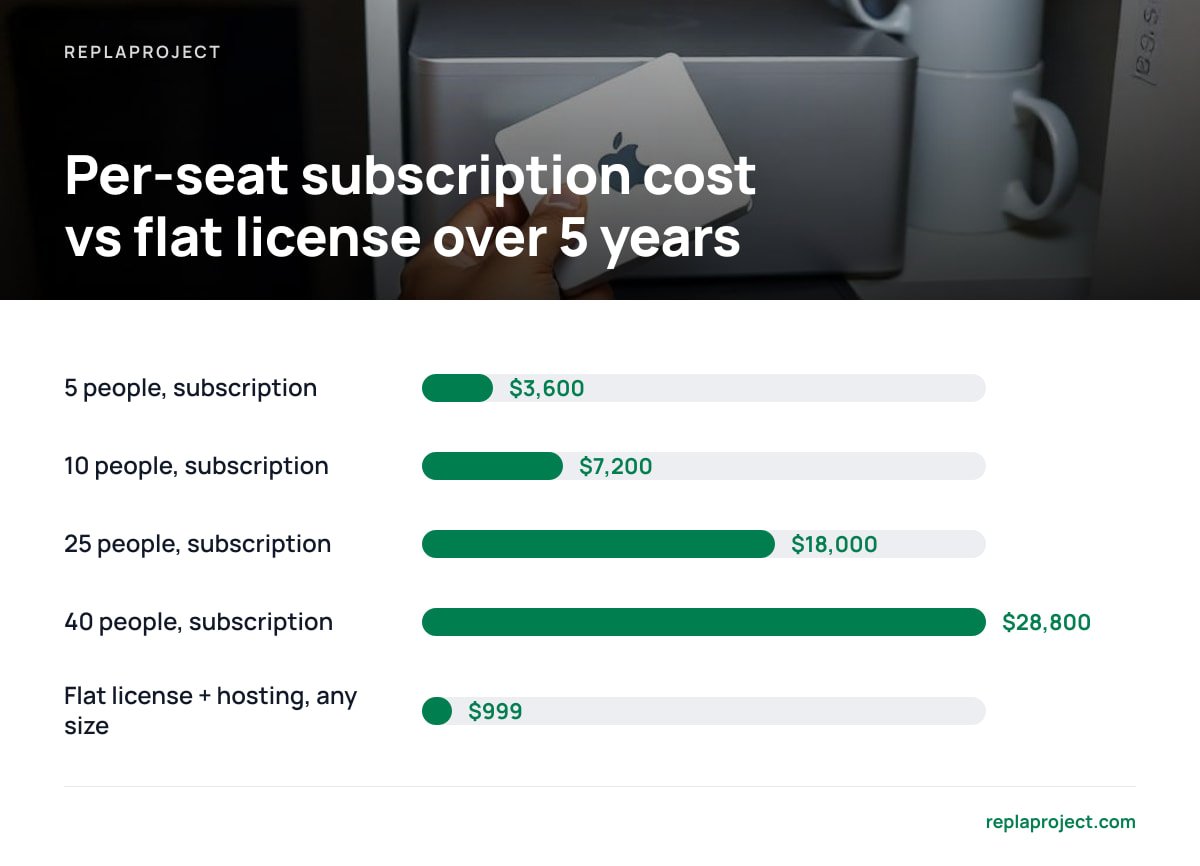
Per-seat pricing looks cheap at the top of a pricing page and expensive on a five-year spreadsheet. The figures below are illustrative. They assume a mid-range subscription at $12 per user per month, a $399 one-time license, and a basic cloud server at $10 a month to host it. Swap in your own numbers. The shape of the result rarely changes.
| Team size | Per-seat subscription, 1 year | Per-seat subscription, 5 years | Flat license + $10/mo hosting, 5 years |
|---|---|---|---|
| 5 people | $720 | $3,600 | $999 |
| 10 people | $1,440 | $7,200 | $999 |
| 25 people | $3,600 | $18,000 | $999 |
| 40 people | $5,760 | $28,800 | $999 |
Two things stand out. The flat-fee column doesn't move as headcount grows. And even at five people, the subscription costs more by year two. If you already have a machine in the office that runs around the clock, the hosting line can drop to nearly zero, though you then carry the hardware risk yourself.
At $12 a seat, a 25-person crew pays $18,000 over five years for software it will never own.
The subscription math also tends to leave out the people you don't give logins to. Plenty of businesses keep field crews and subcontractors out of the tool because each seat costs money. Then they pay for it in phone calls and texted photos of whiteboards. A flat fee removes the reason to ration access.
Choosing a One-Time Purchase Project Management Tool: Self-Hosted or Lifetime Deal
The phrase "one-time purchase" covers two very different products. Know which one you are looking at before you pay.
Self-hosted software you run yourself
You install it on your own server or a cloud server you rent. The vendor ships the software, and you control where it runs and where the data lives. If the vendor goes quiet, your installation keeps working. You lose new updates, but you don't lose the tool. This is the model we recommend for any business that plans to still be operating in five years.
Cloud "lifetime deals"
You pay once for permanent access to a service the vendor hosts. It is convenient: no server, no patching. But the deal is only as durable as the company behind it. If the vendor is acquired, pivots, or decides lifetime users cost too much to support, your "lifetime" can end on someone else's schedule, and you have little leverage.
Open source
Free to license, self-hosted, and sometimes excellent. You pay instead in setup time, missing features, and the hours spent wiring plugins together. We run the numbers in open source, self-hosted project management: the real math, and there is more on the trade-offs in self-hosted task management, open source or not.
Our pick: for a trades business or small office, buy a commercial self-hosted tool with a flat license. You get the durability of owning the software without building it yourself. Choose a lifetime cloud deal only if nobody can look after a server and you are comfortable treating the deal as temporary.
The Hidden Costs of Self-Hosting: Patching, Backups, and Your Time
Self-hosting is cheaper. It is not free. The costs below are the ones vendors tend to leave off the brochure.
- Security updates. Any internet-facing software needs patching. The U.S. Cybersecurity and Infrastructure Security Agency maintains a Known Exploited Vulnerabilities catalog listing flaws that attackers are actively using. That catalog is a good reminder that unpatched servers do get found. Keep both the operating system and the application up to date.
- Backups. If the server dies and you have no backup, you have lost every job, note, and attachment. The UK National Cyber Security Centre's Small Business Guide names backing up data as one of the first things a small business should do, along with keeping devices and software updated.
- Uptime. When a subscription tool goes down, someone else gets paged. When yours goes down, the call comes to you. For a small team on a decent cloud host, outages are rare, but someone needs to know how to restart the service.
- Your time. Expect an hour or two a month for updates and checks once things are set up. If that hour belongs to the owner, put a price on it.
Unpatched internet-facing software is not a theoretical risk. CISA keeps a running catalog of vulnerabilities attackers are exploiting right now.
Pro Tip: Test your backups by restoring them, not by checking that the backup job ran. Once a quarter, spin up a throwaway server, restore last night's backup onto it, and open a few real jobs. A backup you have never restored is a hope, not a plan. It takes about 30 minutes, and it is the one maintenance task small teams skip most often.
Data protection is the other half. If you hold customer names, addresses, and phone numbers, privacy law still applies when the server is yours. In the EU, Article 32 of the General Data Protection Regulation requires "appropriate technical and organisational measures" to secure personal data. Self-hosting doesn't exempt you from that. It does mean you decide where the data physically sits, which some customers and contracts care about.
Features That Actually Matter for Trades Crews and Small Offices

Most project management feature lists are written for software teams. A roofing crew or a five-person accounting office needs a shorter, sharper list.
- Unlimited users at no extra cost. This is the whole point of buying flat-fee. If a "one-time" tool still caps users or charges per seat beyond a threshold, it has simply hidden the subscription somewhere else.
- Request intake that doesn't need retyping. Customer requests arrive by email, web form, and phone. Look for tools that turn a forwarded email or a form submission straight into a job. We compare approaches in software that turns customer requests into jobs.
- Dependency tracking. In trades work, the drywall waits on the inspection, which waits on the electrician. A tool that shows what is blocking a job saves the morning round of phone calls.
- Board, table, and calendar views of the same data. The office wants a table. The crew lead wants a calendar. The owner wants a board. Three views of one dataset beat three separate tools.
- Browser access that works on a phone. Field crews won't install an app for the office's software. A clean mobile web view is enough.
- Plain data export. If you ever leave, you want CSV or a standard database dump, not a proprietary format that only the vendor can read.
Skip features you will never use. Gantt chart theory, portfolio roll-ups, and resource-leveling algorithms make for impressive screenshots. They do little for a team that just needs to know who is on which job on Thursday.
Questions to Ask Before You Pay for a Flat-Fee License
A one-time purchase is only a good deal if the terms hold up. Ask these before you buy, and get the answers in writing or on a public page.
- What does the license cover? Is it perpetual? Does it include future major versions, or only updates within the current one?
- How are security updates delivered, and for how long? A perpetual license with no security patches is a liability with a receipt attached.
- Are there user caps hiding anywhere? Check for limits on users, projects, storage, or "guest" accounts.
- What are the server requirements? Can it run on a small cloud server, or does it need hardware your business doesn't have?
- How do you export your data? Ask for the format, then actually try an export during any trial period.
- What happens to the license if the company is sold? Perpetual licenses for self-hosted software tend to survive acquisitions better than cloud lifetime deals, but ask anyway.
Taxes and Accounting: Does Buying Outright Change Anything?

Sometimes, but not by enough to drive the decision. In the United States, IRS Publication 946 lists off-the-shelf computer software as property that can qualify for the Section 179 deduction. That can let you deduct the purchase in the year you start using the software, subject to limits. Subscriptions, meanwhile, are generally deductible as ordinary business expenses as you pay them.
The practical difference for a $399 purchase is small. Rules differ by country, and even within the U.S. they depend on your situation, so ask your accountant how to book it. Don't buy software for the tax treatment. Buy it because it costs less over the years you will actually use it.
Pay $399 Once and Put Your Whole Crew on the Same Board
ReplaProject is a self-hosted project management tool that costs $399, once, for unlimited people. Every job across every project appears in board, table, and calendar views. Forward an email and it becomes a job. Customers can submit requests through a public intake form instead of your voicemail. Dependency detection flags what is holding each job up, so you can see that the tile order is waiting on the plumber before anyone drives to site. An optional AI assistant, which also works as an MCP server, suggests jobs, and a human approves every one before it lands.
The honest caveat: self-hosted means you, or someone you trust, run the server. Everything in the hidden-costs section above applies to us too. That means patching, backups, and the occasional restart. If nobody on your team can handle that, budget a few hours of help from someone who can. And read the license terms on our site the same way you would read anyone else's.
Frequently Asked Questions
Is a one-time purchase project management tool really cheaper than a subscription?
For most teams larger than a few people, yes, usually within the first two years. A $399 flat license plus around $10 a month in hosting comes to about $1,000 over five years. That is roughly what 10 users would pay for a single year at $12 per seat on a typical subscription.
What is the difference between a self-hosted license and a lifetime deal?
A self-hosted license lets you install and run the software on a server you control, so it keeps working even if the vendor stops trading. A lifetime deal gives you permanent access to a service the vendor hosts, and that access depends on the vendor staying in business and honoring the terms. Self-hosted is more durable. A lifetime deal is more convenient.
Do I need an IT person to run self-hosted project management software?
Not full-time, but someone needs to be comfortable with basic server tasks such as installing updates, checking backups, and restarting a service. Expect an hour or two a month once the setup is done. If nobody in-house can do that, a freelancer on a small retainer is usually far cheaper than per-seat subscription fees.
Are one-time purchase tools secure?
They can be, as long as you keep them patched and backed up. Security for self-hosted software depends heavily on the operator. Guidance such as the UK National Cyber Security Centre's Small Business Guide puts regular updates and backups at the top of the list.
What should I check in the license before buying?
Confirm whether the license is perpetual, how long security updates are provided, and whether any user, project, or storage caps apply. Also check how you can export your data and what happens to your license if the company is sold. Get the answers in writing or on a public page.
Sources
- Known Exploited Vulnerabilities Catalog | Cybersecurity and Infrastructure Security Agency
- Small Business Guide | UK National Cyber Security Centre
- Regulation (EU) 2016/679 (General Data Protection Regulation) | EUR-Lex, European Union
- Publication 946, How To Depreciate Property | Internal Revenue Service