

Yes, you can still buy project management software outright. You pay once for a perpetual license, and adding people doesn't make the bill grow. What matters most is where the software runs. A self-hosted license keeps working if the vendor disappears, while a hosted "lifetime deal" lasts only as long as someone else's servers do. For a team of five or more paying per seat, buying outright usually pays for itself within a year.
TL;DR:
- Buying outright means a perpetual license. You pay once, and the price doesn't climb when you add people.
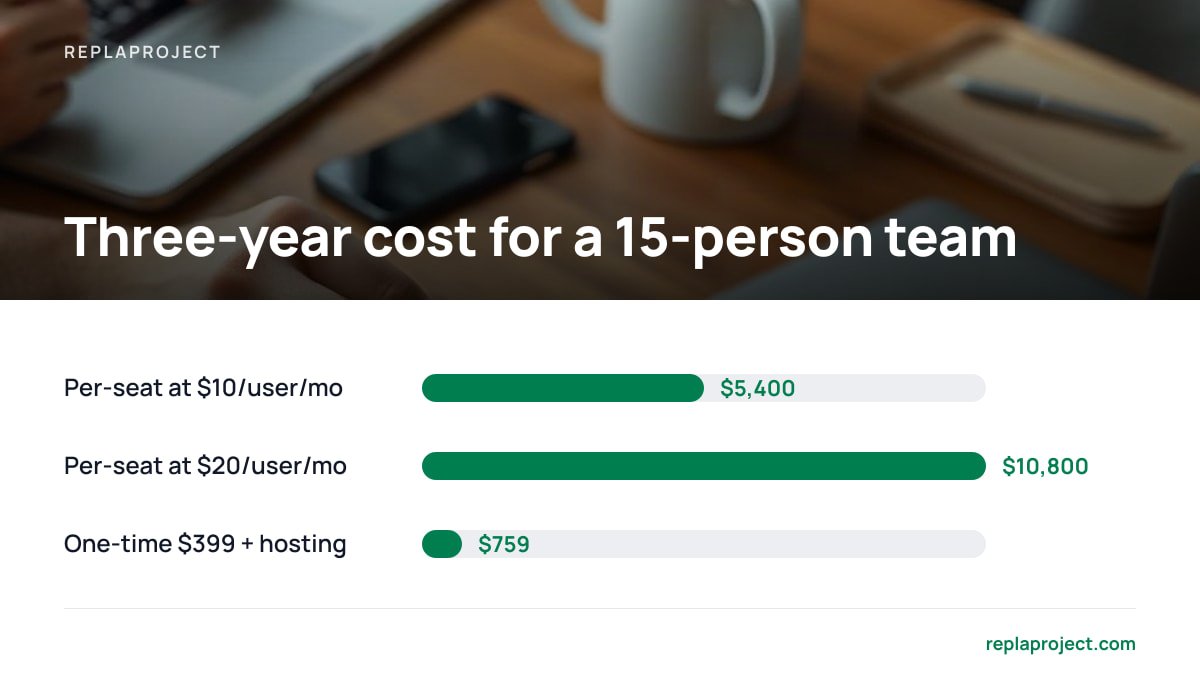
- At typical per-seat rates of $10–$20 per user per month, a 15-person team spends $5,400–$10,800 over three years on a subscription.
- Self-hosted licenses survive a vendor shutting down. Hosted "lifetime deals" don't.
- Free tools exist, but they cost you in seat caps, feature limits, or the hours you spend running them.
- If you're a team of two happily using a free tier, buying outright is the wrong call. Wait until seat fees actually hurt.
Table of Contents
- What It Means to Buy Project Management Software Outright
- How Much Project Management Software Costs, Per Seat and Per Year
- Is There a Completely Free Project Management Software? Yes, With Three Catches
- The Line Items Nobody Puts on the Pricing Page
- When Buying Outright Is the Wrong Call
- Picking a Tool for a Small Team or Trades Crew
- The 80/20 Rule and the AI Question: What Still Needs a Person
- Get Unlimited Users for $399 and Stop Counting Seats
- Frequently Asked Questions
- Sources
What It Means to Buy Project Management Software Outright
When you buy software outright, you're buying a license to use it indefinitely. You don't own the code, and you don't own the vendor. What you own is the right to keep running the version you paid for, whether or not you ever pay again. That's the whole deal. Everything else depends on what the fine print says about updates, hosting, and users.
Four different models get called "one-time purchase," and they behave very differently.
Perpetual license, self-hosted
You pay once, install it on a server you control, and it runs for as long as you keep that server alive. If the company goes under next year, your boards, jobs, and history stay where they are. This is the only model where "you own it" holds up when things go wrong.
Perpetual license with paid upgrades
This is the old desktop-software model. Version 3 is yours forever, but version 4 costs money. It's fine as long as you know which version you're buying and accept that new features may need a new check.
Hosted "lifetime deals"
These are one payment for a cloud account with no monthly fee. They're cheap up front and fragile in the long run, because the vendor is still paying for servers every month with no new revenue from you. We cover the risks in detail in what a lifetime license actually lets you keep.
Open-source software
The Open Source Definition maintained by the Open Source Initiative guarantees free redistribution and access to source code. It doesn't guarantee that anyone will install it, patch it, or answer the phone. The license is free. Your time isn't.
A "lifetime deal" on hosted software lasts exactly as long as the vendor keeps paying its server bill.
How Much Project Management Software Costs, Per Seat and Per Year

Most mainstream project management tools charge per user per month. Free tiers cover small teams with feature caps, and paid plans typically run somewhere between $10 and $25 per user per month, with discounts for annual billing. The number on the pricing page looks small because it's the price of one person for one month. Your actual bill is that number times headcount times twelve, every year.
Here's what that looks like over three years, compared with a $399 one-time license plus an assumed $10 a month for a small cloud server to host it.
| Team size | Per-seat at $10/user/mo (3 yrs) | Per-seat at $20/user/mo (3 yrs) | One-time $399 + ~$10/mo hosting (3 yrs) |
|---|---|---|---|
| 3 people | $1,080 | $2,160 | $759 |
| 8 people | $2,880 | $5,760 | $759 |
| 15 people | $5,400 | $10,800 | $759 |
| 30 people | $10,800 | $21,600 | $759 |
The hosting figure is an assumption. You might run the software on a spare office machine for close to nothing, or pay more for a managed server with backups. Even if you triple the hosting cost, the outright option still wins well before year two for any team above a handful of people.
At $20 a seat, a 15-person crew pays $3,600 a year to rent the same boards it used last year.
There's also a tax angle that most comparison lists skip. IRS Publication 946 treats off-the-shelf computer software as eligible for the Section 179 deduction, or for depreciation over 36 months. Subscriptions are generally deducted as an ordinary expense year by year. Neither is automatically better, so ask your accountant which treatment suits your books before you buy.
For a fuller breakdown of payment models, see our guide to project management software with a one-time payment.
Is There a Completely Free Project Management Software? Yes, With Three Catches
There is completely free project management software. Every "top 10 free tools" list you'll find is mostly a list of freemium tiers, though, and the free part comes with conditions. Free usually means one of three things, and each one sends the bill somewhere else.
- Seat caps. Freemium plans often limit how many people can join a workspace. The day you hire the next person or invite a subcontractor, you're on a paid plan priced per seat.
- Feature walls. Calendar views, dependencies, automations, and guest access tend to sit behind the paywall. Those are exactly the features a growing team starts needing.
- Your own labor. Open-source tools you download and install are free to license. You still pay in setup time, updates, backups, and the afternoon you lose when an upgrade breaks something.
If you're a team of two or three and a free tier does the job, use it. It's the cheapest software you'll ever own. Just don't build five years of job history inside a tool whose free plan can change terms without asking you.
The Line Items Nobody Puts on the Pricing Page
Buying outright removes the per-seat bill. It doesn't remove every cost, and you should know what's left before you pay.
- Hosting. Self-hosted software needs somewhere to run, either a small cloud server or a machine in your office. Budget a few dollars to a few tens of dollars a month, depending on how much you want someone else handling the hardware.
- Backups. Nobody else is backing up your data for you. Schedule automatic backups to a second location on day one, before you have anything worth losing.
- Security updates. A self-hosted app on the open internet needs patches applied. Check how the vendor ships updates and whether they're included in your license.
- Migration. Moving years of tasks out of a subscription tool takes an afternoon if exports are clean, and a week if they aren't. Test the export before you cancel anything.
Pro Tip: Before you buy any one-time license, ask the vendor one question in writing: "If you shut down tomorrow, does my copy keep working?" A self-hosted product should answer yes without hesitating. If the answer involves a license server phoning home, your "perpetual" license has an off switch you don't control.
When Buying Outright Is the Wrong Call
The obvious answer, "own it, don't rent it," isn't always right. Here are the cases where a subscription is the better choice.
- You're tiny and the free tier fits. Two people on a free plan pay nothing. A $399 license is a worse deal until seat fees start showing up.
- Nobody can look after a server. If no one on the team can handle basic backups and updates, and you won't pay someone who can, a hosted subscription moves that job to the vendor. That's worth money.
- You depend on dozens of integrations. Large subscription platforms have broad catalogs of connectors. A focused self-hosted tool will cover the essentials, not everything.
- The project is short. For a six-month engagement with a fixed team, a few months of subscription is cheaper than buying and setting anything up.
For everyone else, especially teams that keep growing, bring in subcontractors, or have occasional users they resent paying for, per-seat pricing is a tax on headcount. That's the case we make in more detail on project management with no per-user fee.
Picking a Tool for a Small Team or Trades Crew

Lists of the most popular project management software rank tools by how many features they have. A small office or site crew needs a short list of features that actually get used every day.
- Views that match how you think. A board for status, a table for the office, and a calendar for scheduling crews. If you can see every job across every project in one place, you'll stop asking "where are we on the Henderson job?"
- Intake that doesn't need retyping. Most work arrives by email or a phone call that turns into an email. A tool that turns a forwarded email into a task saves a surprising number of hours.
- A way for customers to ask. A public request form stops customer requests from living in someone's personal inbox.
- Dependencies that flag themselves. The question that matters most on any job is what's holding it up. Software that works that out for you beats software you have to update by hand.
- Unlimited people. Subcontractors, part-timers, and the bookkeeper who checks in monthly shouldn't each cost a seat.
If a tool does those five things well, it beats a tool with forty features you'll pay for and never open.
The 80/20 Rule and the AI Question: What Still Needs a Person
The 80/20 rule for project managers is the Pareto principle applied to work: roughly 80% of results come from about 20% of tasks, and most delays trace back to a small number of blockers. In practice, it means you should find the handful of jobs everything else depends on and protect those first. Good software helps by showing you dependencies, so the 20% that matters isn't buried in the other 80%.
Will the PMP be replaced by AI? Not in any way that matters to a small business. In a 2019 press release, Gartner predicted that by 2030, 80% of the work in today's project management discipline would be eliminated as AI takes over tasks like data collection, tracking, and reporting. That prediction is about tasks, not judgment. The PMP certification from PMI tests your ability to handle people, trade-offs, and risk, and those decisions still need someone accountable for them.
The sensible way to use AI in project management is as an assistant that suggests and a person who approves. Let it draft jobs from an email thread or flag a likely blocker. Don't let it reshuffle a crew's week on its own.
Get Unlimited Users for $399 and Stop Counting Seats
ReplaProject is a self-hosted project management tool you buy once for $399, with no per-user fee. You can add the whole office, every site crew, and your subcontractors without the bill changing. It gives you board, table, and calendar views of every job across every project. It turns forwarded emails into tasks, takes customer requests through a public form, and detects dependencies automatically so you can see what's holding a job up. An optional AI assistant suggests jobs, and a person approves them before anything changes.
The honest caveat is that self-hosted means you, or someone you trust, run the server and the backups. If nobody on your team will do that, a subscription may suit you better. If someone will, ReplaProject keeps running whether or not we're around, and you can check the spec sheet before you buy.
Frequently Asked Questions
Can I buy project management software outright online?
Yes. Several vendors sell perpetual licenses you can pay for once and download, usually for self-hosting. Before buying, check whether the license covers future updates and whether the software keeps working without contacting the vendor's servers.
How much does project management software cost?
Subscription tools typically charge about $10–$25 per user per month on paid plans, and most offer limited free tiers. One-time licenses for small teams can cost a few hundred dollars total, plus hosting. The cheapest option depends mostly on how many people need access.
Is there a completely free project management software?
Yes. Free tiers and open-source tools both exist. Free tiers usually cap seats or features, and open-source tools cost you time to install, update, and back up. Free works well for very small teams with simple needs.
What is the 80/20 rule for project managers?
It's the Pareto principle applied to projects: roughly 80% of results come from about 20% of the work. For project managers, it means finding the few tasks and blockers everything else depends on and protecting those first.
Will PMP be replaced by AI?
Unlikely. AI is taking over routine project management tasks such as tracking, status reporting, and data entry. The PMP credential focuses on judgment, stakeholder management, and risk decisions, which still need an accountable person.
Is self-hosted project management software hard to run?
For a small team it's usually manageable. You need a small server or office machine, automatic backups, and a routine for applying updates. If no one can handle that, factor in the cost of paying someone or choose a hosted subscription.
Sources
- The Open Source Definition | Open Source Initiative
- Publication 946, How To Depreciate Property | Internal Revenue Service
- Gartner Newsroom | Gartner
- Project Management Professional (PMP) Certification | Project Management Institute