

A project management app with no subscription required comes in two very different forms. One is a free tier that's really a subscription waiting for you to grow. The other is software you license once and own. The distinction that matters is who counts as a user: free tiers cap seats, so the bill starts the moment you add a subcontractor or an office temp. A one-time license, whether self-hosted or open source, lets you add people without the meter running.
TL;DR:
- Most "free" project management apps are free tiers with user, storage, or feature caps, and they turn into subscriptions as your team grows.
- True no-subscription options are open-source software, desktop Gantt apps, and one-time-purchase licenses. Each one moves some cost from money to your time.
- At an illustrative $12 per seat, an 8-person team pays $1,152 a year, which is enough to cover a $399 flat license before month five.
- For construction and trades crews, per-seat pricing is the trap, because subcontractors and seasonal workers all count as users.
- Self-hosting is not free to run. Budget for a server, HTTPS, backups, and someone who applies updates.
Table of Contents
- Project Management Apps With No Subscription Required: The Four Kinds That Exist
- The Per-Seat Math: Why the Subscription Is the Expensive Option
- Top 5 Project Management Software Types, Ranked for a Team That Won't Pay Monthly
- Which App Is Best for Doing a Project? It Depends on Whether It's One Project or Forty
- Free Apps for Construction Site Projects, and Why the Obvious Pick Breaks
- Is There a Free Alternative to the Big Desktop Scheduler? Yes, If You Work Alone
- Self-Hosting's Hidden Bills: Servers, Security, and Updates
- Get Unlimited Users for One $399 Payment, With No Meter Running
- Frequently Asked Questions
- Sources
Project Management Apps With No Subscription Required: The Four Kinds That Exist

Search for this and you get dozens of lists. Most of them blur together four categories that behave nothing alike. Once you know which category a tool falls into, you can predict what it will cost you in two years.
- Free tiers of subscription software. The app is hosted by the vendor and free up to a limit, usually a user count, a project count, storage, or features like automations and calendar views. This is a subscription with a delayed start date. It's fine until your team grows, and then it isn't.
- Open-source, self-hosted suites. The license costs nothing. Under licenses that meet the Open Source Definition from the Open Source Initiative, you're free to run, study, and redistribute the software. You pay instead in server costs and the hours someone spends installing and maintaining it.
- Desktop Gantt and scheduling apps. These install on one computer, save to a file, and work offline. They're excellent for planning a single project. They're poor at coordinating a team, because only one person holds the file at a time.
- One-time-purchase licenses. You pay once and run the software yourself or on your own hosting. No seat meter, no renewal. Ownership details vary, and we cover them in what a lifetime license actually lets you own.
Only the last three are genuinely subscription-free. The first is a marketing category, not a pricing model.
The Per-Seat Math: Why the Subscription Is the Expensive Option

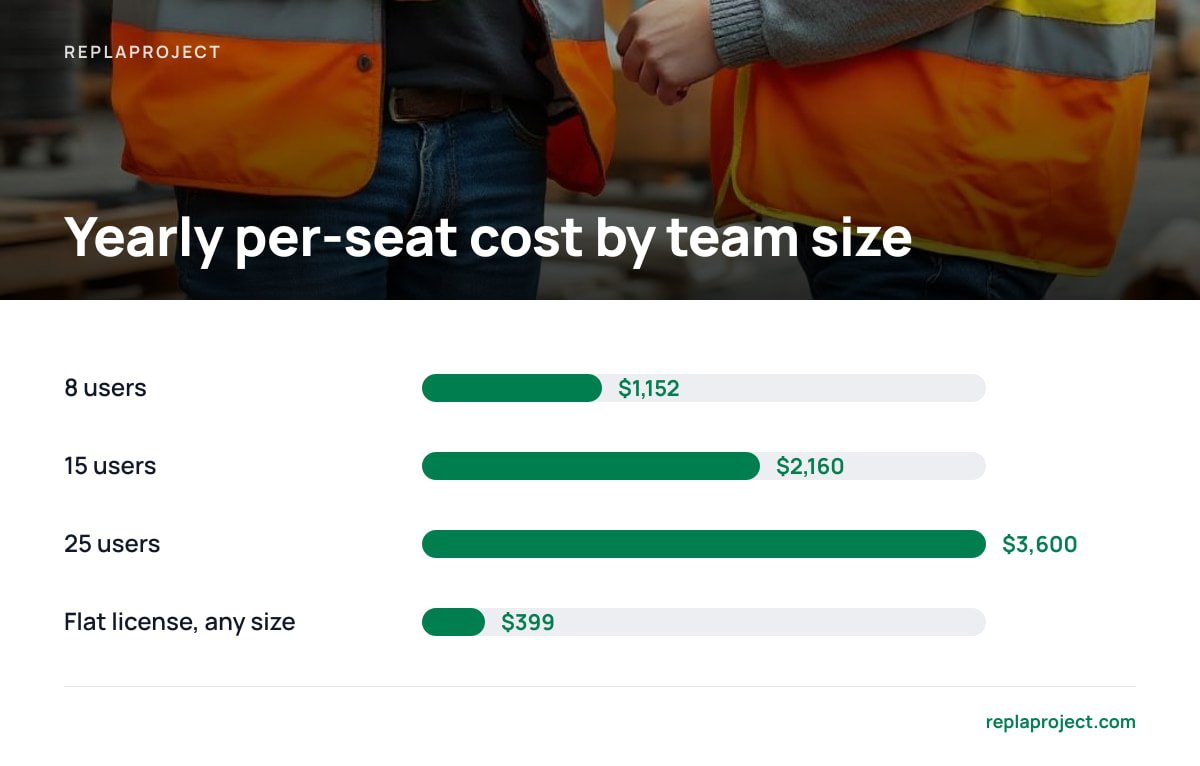
Per-seat pricing looks cheap because vendors quote it per person, per month. Multiply it out and it stops looking cheap. Take an illustrative paid tier at $12 per user per month, which is a common price band for team plans. An 8-person team pays $96 a month, or $1,152 a year, and pays it again next year.
Eight people at $12 a seat is $1,152 a year, every year. A $399 flat license pays for itself during the fifth month.
The gap widens as you add people, because a flat fee doesn't move. At 15 users the same per-seat plan runs $2,160 a year. At 25 it's $3,600. Annual billing discounts shave a little off but don't change the shape of the curve. If you want the full break-even table by team size, we worked it out in flat fee vs. per-seat pricing.
The other cost of per-seat pricing doesn't show up on the invoice: rationing. When every login costs money, owners stop adding the people who only need to see the schedule. The foreman, the part-time bookkeeper, and the sub who just needs to know when the slab is poured end up getting texts instead. Your project tool becomes a record kept by three people about the work of fifteen.
Top 5 Project Management Software Types, Ranked for a Team That Won't Pay Monthly
The honest answer to "what are the top 5 project management software" is that brand rankings change every year, and the review sites ranking them are usually paid per click. A more durable answer ranks the five types of tool by how well they serve a team that refuses a monthly bill.
| Rank | Type | Upfront cost | Ongoing cost | User limit | Who maintains it | Best for |
|---|---|---|---|---|---|---|
| 1 | One-time-purchase, self-hosted | Flat license fee | Hosting (or none on an existing office machine) | Usually unlimited | You, with vendor updates | Small teams and trades crews that keep growing |
| 2 | Open-source, self-hosted suite | $0 | Hosting plus admin time | Unlimited | You, entirely | Teams with an in-house technical person |
| 3 | Desktop Gantt app | $0 to modest | None | One editor at a time | You | Planning a single complex project solo |
| 4 | Free tier of a subscription app | $0 | $0 until you hit a cap, then per-seat | Capped | Vendor | Freelancers and teams of 2–3 who won't grow |
| 5 | Shared spreadsheet | $0 | None | Unlimited, but chaotic | Whoever breaks it last | Very short projects with no dependencies |
Our pick for a team of five or more is the one-time license. The open-source suite costs less on paper but asks for more of your time. The free tier is cheapest only if your headcount never changes, and in a trades business it always changes.
Pro Tip: Before you commit to any tool, export a real project to CSV and try importing it somewhere else. If the export drops comments, dependencies, or attachments, you aren't using a tool. You're renting a filing cabinet with a lock on it. This matters even more for subscription-free software, because nobody will migrate your data for you when you switch.
Which App Is Best for Doing a Project? It Depends on Whether It's One Project or Forty
The Project Management Institute, which publishes the PMBOK Guide, defines a project as a temporary endeavor that creates a unique result. That definition is useful here because it separates two very different buyers.
If you're doing one project, such as a kitchen remodel, an office move, or a product launch, the best app is usually a desktop Gantt tool or even a well-built spreadsheet. You need a timeline, task dependencies, and a critical path. You don't need logins for twelve people.
If you're running forty jobs at once, which is what most small businesses actually do, you need something else. You need to see every job across every project on one board or calendar. Requests have to arrive without retyping, and you have to see which job is blocking which. A single-project scheduler breaks down here, because each project lives in its own file and nobody can see the whole week.
Most people searching for "the best app for a project" are really in the second group and don't realize it yet. If your week involves juggling more than one customer, buy for forty.
Free Apps for Construction Site Projects, and Why the Obvious Pick Breaks
The obvious answer for a construction crew is a free tier of a popular board app. It's quick to set up, it works on a phone, and it costs nothing. For a three-person renovation outfit, that's a reasonable choice.
It fails at the first real job, because construction teams are unusually seat-heavy. A modest residential build can involve an owner, a site lead, an office manager, an electrician, a plumber, a drywall sub, and the client. That's seven people, and most free tiers cap well below that or strip out guest access. Then you're either paying per seat for people who log in twice a month or going back to group texts.
The best free option for construction site projects, if it has to be $0, is a self-hosted open-source suite run by someone comfortable with a Linux server. It has no user caps, so subs can have accounts. The cost is that someone on your team becomes the IT department. If nobody wants that job, a one-time license is the cheapest option that doesn't require one. Whatever you choose, check for three things crews actually use:
- Calendar view. Site work is scheduled by day, not by sprint. If the app can't show "who's where on Thursday," it's the wrong app.
- Dependency tracking. Drywall waits on the electrical inspection. You want the tool to flag the blocked job, not rely on someone remembering.
- Intake that doesn't need a login. Customer change requests and supplier emails should land as tasks without the customer needing an account.
Is There a Free Alternative to the Big Desktop Scheduler? Yes, If You Work Alone
You know the one: the desktop scheduling suite most offices learned Gantt charts on, now sold per user. Free alternatives exist, and the good ones are open-source. Several open-source desktop schedulers open the same file format, draw Gantt charts with dependencies, calculate the critical path, and level resources. Many are released under the GNU General Public License, which guarantees your right to run the program for any purpose without paying.
The catch is the same one the paid original has. These are single-user, file-based tools. They're built for a planner who builds the schedule and emails a PDF to everyone else. If that describes how you work, a free desktop scheduler is a near-perfect substitute.
If what you actually want is for the crew to see and update the schedule themselves, the desktop scheduler was never the right tool, free or otherwise. In that case you're looking for a team tool with no per-user fee, and we compare the real options with no per-user fee separately.
Self-Hosting's Hidden Bills: Servers, Security, and Updates
"No subscription" doesn't mean "no recurring cost" if you run the software yourself. Be honest with yourself about these before you buy anything self-hosted, ours included.
- Hosting. A small virtual server typically runs a modest monthly fee, which is technically a subscription. You can avoid it by running the app on a machine already in your office, as long as you accept that it's only reachable when that machine is on and online.
- HTTPS. Anything that handles customer emails or a public intake form needs encryption. Let's Encrypt issues free, automated TLS certificates, so this costs time rather than money.
- Access control. Broken access control is the top-ranked risk in the OWASP Top 10, the most widely cited list of web application security risks. On a self-hosted app, you set who can see what. Remove ex-employees on their last day, not three months later.
- Backups and updates. The vendor ships patches. You install them. Schedule a nightly backup and test a restore once, before you need it.
A self-hosted tool is only as secure as the last update you actually installed.
None of this should scare you off. It takes an afternoon to set up and a few minutes a month to keep running. Compare that to a per-seat bill rising every time you hire, and decide which cost you'd rather carry. For a broader look at what you get for a single payment, see what to actually buy with a one-time payment.
Get Unlimited Users for One $399 Payment, With No Meter Running

ReplaProject is built for the problem this article keeps returning to: small teams that grow, shrink, and bring in subs, and get billed for every face. You pay $399 once and add as many people as you like. Every job across every project shows up in board, table, and calendar views, so Thursday's site schedule is one click away. Forward an email and it becomes a job. Customers can submit requests through a public intake form without needing an account. Automatic dependency detection shows what's holding each job up, and an optional AI assistant suggests jobs that a human approves before anything is created.
The honest limit is that ReplaProject is self-hosted. You or someone you trust will need to run it on a server or office machine, put it behind HTTPS, and apply updates. If nobody on your team wants that job, factor in a few hours of help from an IT contractor before you count the savings.
Frequently Asked Questions
Is there a project management app with no subscription required at all?
Yes. Open-source self-hosted suites, desktop Gantt apps, and one-time-purchase licenses all run without a recurring license fee. Free tiers of subscription apps don't qualify, because they start charging once you pass their user or feature caps.
What is the cheapest project management option for a team of 10?
In license cost, an open-source self-hosted tool is $0, but you pay in setup and maintenance time. At an illustrative $12 per seat, a 10-person subscription costs $1,440 a year, so a flat one-time license is usually cheaper within the first year.
Do self-hosted project management apps still have ongoing costs?
Usually, yes. Expect a small monthly server fee unless you run it on an existing office machine, plus your time for backups and updates. Free TLS certificates from Let's Encrypt keep encryption from adding a cost.
Is there a free alternative to desktop project scheduling software?
Yes. Open-source desktop schedulers handle Gantt charts, dependencies, and critical-path calculation at no cost, and many are licensed under the GNU GPL. They're single-user and file-based, so they suit a solo planner better than a team that needs to update the schedule together.
What should construction crews look for in project management software?
Look for a calendar view by day, automatic dependency tracking, and a way for customers or suppliers to submit requests without a login. Above all, avoid per-seat pricing, because subcontractors and seasonal workers quickly push free tiers past their user caps.
Sources
- The Open Source Definition | Open Source Initiative
- GNU General Public License v3.0 | Free Software Foundation
- PMBOK Guide and Standards | Project Management Institute
- Let's Encrypt | Internet Security Research Group
- OWASP Top Ten | OWASP Foundation