

The best Trello alternative with unlimited users is the one that removes the per-seat meter entirely, not one that just raises the cap. For a small business, that usually means a flat-fee tool you host yourself, because free tiers and "unlimited" plans tend to ration something else: boards, storage, automations, or guests. Judge any option by what you'd pay at 25 people, not at 5.
TL;DR:
- "Unlimited users" is often a marketing phrase. Check what else is capped: boards, storage, guests, automation runs.
- There are four real routes: a free tier, an open source tool, a flat-fee SaaS plan, or a one-time-purchase tool you host.
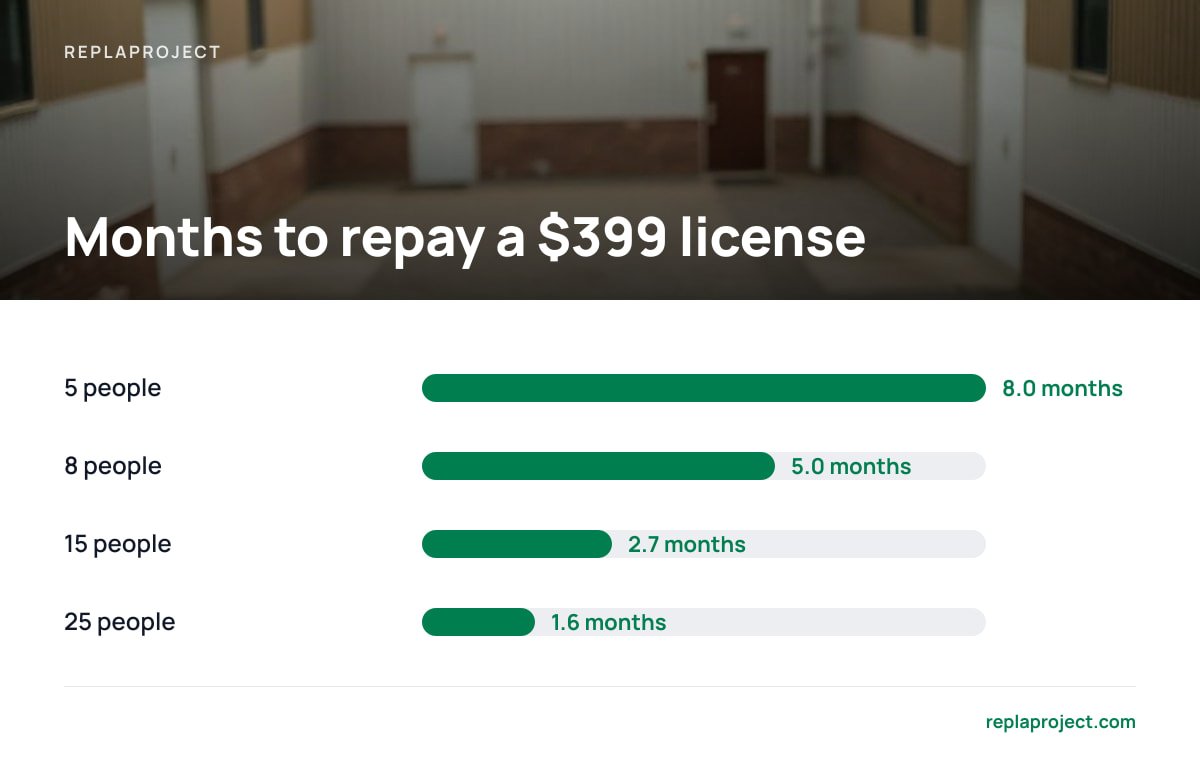
- At a hypothetical $10 per seat per month, 15 people cost $1,800 a year. A $399 one-time license pays back in under three months.
- Free and open source cost you time instead of money: hosting, updates, backups, and the weekend someone spends setting it up.
- Microsoft's board tool is a fair pick if you already pay for its suite. Otherwise it is a poor fit for subcontractors and customers.
Table of Contents
- What "Unlimited Users" Actually Means (and Where Vendors Hide the Limit)
- Four Routes to a Trello Alternative With Unlimited Users
- Are There Better Alternatives to Trello?
- How Many Users Can Use Trello for Free?
- Does Microsoft Have a Trello Alternative?
- Are People Still Using Trello?
- The Break-Even Math: When Flat Fee Beats Per-Seat
- Free, Open Source, and GitHub: The Price Is Your Weekend
- Apps Like Trello for Personal Use and Artists
- Get Unlimited Users on a Board, Table, and Calendar for $399, Once
- Frequently Asked Questions
- Sources
What "Unlimited Users" Actually Means (and Where Vendors Hide the Limit)
Search for a Trello alternative with unlimited users and every result promises the same thing. Read the pricing page and the limit has usually just moved somewhere else.
- Capped boards or projects. The user count is unlimited, but you get three boards on the free plan.
- Guests treated differently. Your subcontractor counts as a full seat, or can only comment.
- Storage and file size. Attachments hit a ceiling long before the people do.
- Automation quotas. The "unlimited users" plan includes a few hundred automation runs a month.
- Active-member billing. You aren't charged per seat, but you are charged per person who logged in this month.
The cap that matters is rarely the user count. It is boards, storage, automation runs, or whatever the vendor knows you'll hit in month four.
Before you compare anything, write down who actually touches your jobs. In a ten-person trades business that might be two office staff who edit constantly, six crew leads who update a status twice a day, and two subcontractors who need to see one job. Those are three different needs, and only one of them should cost you a full seat.
Four Routes to a Trello Alternative With Unlimited Users

Every option on the first page of results falls into one of four buckets. Here is the honest version.
Free tiers
Free is fine for a team of three with one project. It stops being fine when you need more boards, a calendar view across all jobs, or a way to show who is waiting on whom. Free tiers exist to get you onto the paid plan, so expect the walls to sit exactly where growth starts.
Open source, self-hosted
You get real unlimited users and no license fee. You also get a server to maintain. More on that below.
Flat-fee or workspace-priced SaaS
Some vendors charge per workspace instead of per person. That fixes the headcount problem but keeps you on a monthly bill forever. Read our breakdown in Flat Fee vs Per-Seat PM Pricing: The Break-Even Math by Team Size before you assume it's cheaper.
One-time purchase, self-hosted
You pay once, run it on your own server, and add as many people as you like. The trade-off is that you own the hosting. We cover what you keep and what you don't in Lifetime License Project Management Software: What You Really Own.
My pick for a small trades or office team that wants to stop renting software: the fourth route. A free tier is a trial, open source is a hobby unless someone on staff enjoys servers, and a flat monthly workspace fee is still a subscription.
Are There Better Alternatives to Trello?
Yes, but "better" depends on what is wrong with what you have. A card board is a good tool for one workflow: a stream of tasks moving through stages. It is a weak tool for four things small businesses run into.
- Cross-project visibility. Boards are per-project. If you run twelve jobs, you want one view of everything due this week.
- Dependencies. "Can't order tiles until the plumbing inspection passes" does not live on a card. It lives in someone's head.
- Intake. Customer requests arrive by email and web form, then get retyped into cards by hand.
- Pricing that scales with headcount. Every new hire or subcontractor adds to the bill.
The Project Management Institute recognizes four dependency types in its PMBOK Guide. Small teams almost always need only one, finish-to-start: job B can't begin until job A is done. A tool that detects that relationship and shows you what is holding a job up beats one that makes you remember it.
So the better alternative is the one that fixes your actual pain. If your only complaint is the bill, a cheaper board will do. If your complaint is that nobody can see what is blocked, you need more than a cheaper board.
How Many Users Can Use Trello for Free?
The free plan has historically capped a workspace at 10 collaborators, with limits on boards and automation as well. Vendors change these numbers, so check the current pricing page before you plan around it.
The more useful question is what happens at collaborator number 11. You either upgrade the whole workspace to a per-user plan, or you start sharing logins, which is a bad idea for audit trails and worse for security. Anyone who has watched a crew lead's shared password get passed around a job site knows how that ends.
If you are a team of six with a couple of occasional subcontractors, the free tier might hold for a while. If you expect to grow past ten, or you want customers and subs inside the system, price the paid plan at your future headcount rather than your current one.
Does Microsoft Have a Trello Alternative?
Yes. Microsoft bundles a board-style task planner into its 365 subscriptions, and it works well for what it is. If your whole office already pays for those licenses, you have a free, serviceable board.
The catch is that it lives inside Microsoft's licensing and identity setup. Adding an outside subcontractor means sorting out guest accounts rather than typing an email address. It also has no built-in way to turn an inbound customer email into a job, and nothing that tells you what is blocked by what across projects.
My take: pick it if your team already lives in that suite and your workflow is simple task tracking. Skip it if you coordinate people outside your company or want one view across all your jobs.
Are People Still Using Trello?
Yes. It remains one of the most widely used card-board tools, and nothing about the product has stopped working. The reason people search for alternatives is almost never "it's dead." It is "the bill grew faster than the team did," or "we outgrew boards."
That matters because it changes what you should do. If the tool works and the price is tolerable at your size, staying put is a legitimate answer. Switching costs real hours: exporting, retraining, and rebuilding habits. Switch when per-seat cost or a missing capability is hurting you, not because a listicle told you to.
The Break-Even Math: When Flat Fee Beats Per-Seat

Here is the arithmetic, using an illustrative $10 per seat per month. Plug in your own rate.
| Team size | Monthly cost | Annual cost | Months to repay a $399 one-time license |
|---|---|---|---|
| 5 people | $50 | $600 | 8.0 |
| 8 people | $80 | $960 | 5.0 |
| 15 people | $150 | $1,800 | 2.7 |
| 25 people | $250 | $3,000 | 1.6 |
Fifteen people at $10 a seat is $1,800 a year. A $399 flat license is paid back in under three months.
This table ignores hosting, which on a small virtual server commonly runs somewhere around $5 to $10 a month, and it ignores your time. Even adding both, the flat option wins quickly past about six people. For the deeper version, see Buy Project Management Software Outright: The Real Math.
Pro Tip: Before you commit to any tool, run an exit test. Build twenty cards or jobs with attachments, comments, and due dates, then export everything and open the file. If the export loses comments or attachments, you've learned what leaving will cost you. Do it on day one, not in year three.
Free, Open Source, and GitHub: The Price Is Your Weekend
Threads on Reddit and repositories on GitHub are full of free, self-hosted board tools, and several are good. Under the Open Source Definition, open source software comes with the freedom to use, modify, and redistribute it. That is a real benefit, but it says nothing about who will install and maintain it for you.
What you take on when you self-host anything, free or paid:
- Updates. Someone has to apply them. OWASP's Top Ten lists vulnerable and outdated components as a standing web-application risk, and a server nobody patches is exactly that.
- Backups. If the server dies, your job history goes with it unless you've set up copies somewhere else.
- Support. Free projects mean forum posts and volunteer goodwill. Fine until it's Monday morning and a crew can't see the schedule.
- Features you assume exist. Email intake and dependency tracking are often missing or half-built.
Free open source is a good fit if you have a technical person who enjoys this. For everyone else, it is a cheap tool that costs a lot of attention. Our guide on Project Management Without Monthly Fees: What Actually Exists goes through the options.
Apps Like Trello for Personal Use and Artists

If you are one person, or a small creative studio, you don't need unlimited users. You need a free tier that doesn't nag. A basic board, a shared spreadsheet, or a plain notes app will carry a freelancer through commissions, deadlines, and client revisions.
Artists tend to outgrow boards at one specific point: when several clients each have multiple pieces at different stages and revisions. That is when a calendar view and a table view matter more than another column of cards. Until then, keep it simple and free. Paying per seat to track your own to-do list is the one version of this problem that is entirely avoidable.
Get Unlimited Users on a Board, Table, and Calendar for $399, Once
The problem this article described is a bill that grows every time you add a person, plus a board that can't tell you what's blocked. ReplaProject is built for exactly that. It's a self-hosted project tool you buy once for $399 flat, with no per-seat charge for office staff, crew leads, or subcontractors. Jobs show up as a board, a table, or a calendar across every project. Forward an email and it becomes a job, a public intake form takes customer requests, and dependency detection shows what's holding something up.
There's also an AI assistant and MCP server (the Model Context Protocol is an open standard for connecting AI tools to software) that suggests jobs, and a human approves every one before it exists.
The honest caveat: you host it yourself. That means you need somewhere to run it and a plan for backups and updates. Check the spec sheet for hosting requirements before you buy, and if nobody on your team wants that responsibility, a hosted subscription may still be the better call for you.
Frequently Asked Questions
What is the best Trello alternative with unlimited users?
For a small business, the best option is usually a self-hosted, one-time-purchase tool, because it removes per-seat billing entirely instead of just raising the cap. Free tiers and open source tools can work too, but they trade money for limits or for your time. Compare any option at your expected headcount in two years, not today.
How many users can use Trello for free?
Historically the free plan has capped a workspace at 10 collaborators, with additional limits on boards and automation. Vendors change these limits, so confirm on the current pricing page. Beyond the cap, you generally need a paid per-user plan.
Does Microsoft have a Trello alternative?
Yes, Microsoft includes a board-style task planner in its 365 subscriptions. It suits offices already paying for that suite, but it is less convenient for outside subcontractors or customers and has no built-in email-to-job intake.
Are people still using Trello?
Yes, it remains widely used and works as it always has. People look for alternatives mainly because per-user costs rise with headcount or because they need cross-project views and dependency tracking that boards don't provide.
Is there a free, open source alternative with unlimited users?
Yes, several open source board tools can be self-hosted with no user limit, and you can find them on GitHub. The cost is maintenance: you handle hosting, updates, backups, and support yourself, and features like email intake may be missing.
When does a one-time purchase beat a monthly per-seat plan?
At an illustrative $10 per seat per month, a $399 flat license pays for itself in about five months for eight people and under three months for fifteen. Add hosting and your own time to the calculation, since the license price is not the whole cost.
Sources
- PMBOK Guide and project dependency standards | Project Management Institute
- The Open Source Definition | Open Source Initiative
- OWASP Top Ten | OWASP Foundation
- Model Context Protocol | Model Context Protocol project