

A good Trello replacement for small teams keeps the simple board view you already like and stops charging you every time you add a person. Pricing model matters more than features. A per-seat subscription punishes you for bringing in the subcontractor, the part-timer, or the office manager who only checks in twice a week. A flat-fee tool lets everyone in. Once pricing is settled, the two features worth paying for are email intake and dependency tracking.
TL;DR:
- Per-seat pricing is the real reason small teams outgrow their board tool. The cost rises with every hire, every season, and every year you keep paying.
- A good replacement needs board, table, and calendar views of the same jobs, so the office and the crew can each work the way they think.
- Email-to-task intake matters more than integrations. Most small-business work arrives as an email, not as a card someone remembered to make.
- Dependency tracking is the feature small teams don't know they're missing. It answers "what's holding this up?" without a meeting.
- Self-hosting ends the monthly bill but makes you responsible for backups and updates. Price that work in before you switch.
Table of Contents
- The Real Problem Isn't the Board, It's the Bill
- What Makes a Good Trello Replacement for Small Teams: Five Non-Negotiables
- Where the Work Comes From: Email and Customer Requests
- Dependencies: The Feature Small Teams Don't Know They're Missing
- Self-Hosted vs. Cloud: Who Holds the Keys, and Who Holds the Liability
- How to Switch Without Losing a Week
- Get Unlimited People on One Board for a Single $399 Payment
- Frequently Asked Questions
- Sources
The Real Problem Isn't the Board, It's the Bill

Most small teams don't leave their board tool because the cards stopped working. They leave because the invoice keeps growing. Per-seat pricing seems harmless at three people. Then you add a foreman, two subcontractors, a bookkeeper who needs to see invoicing status, and a seasonal hire, and suddenly you're paying monthly for people who log in once a week.
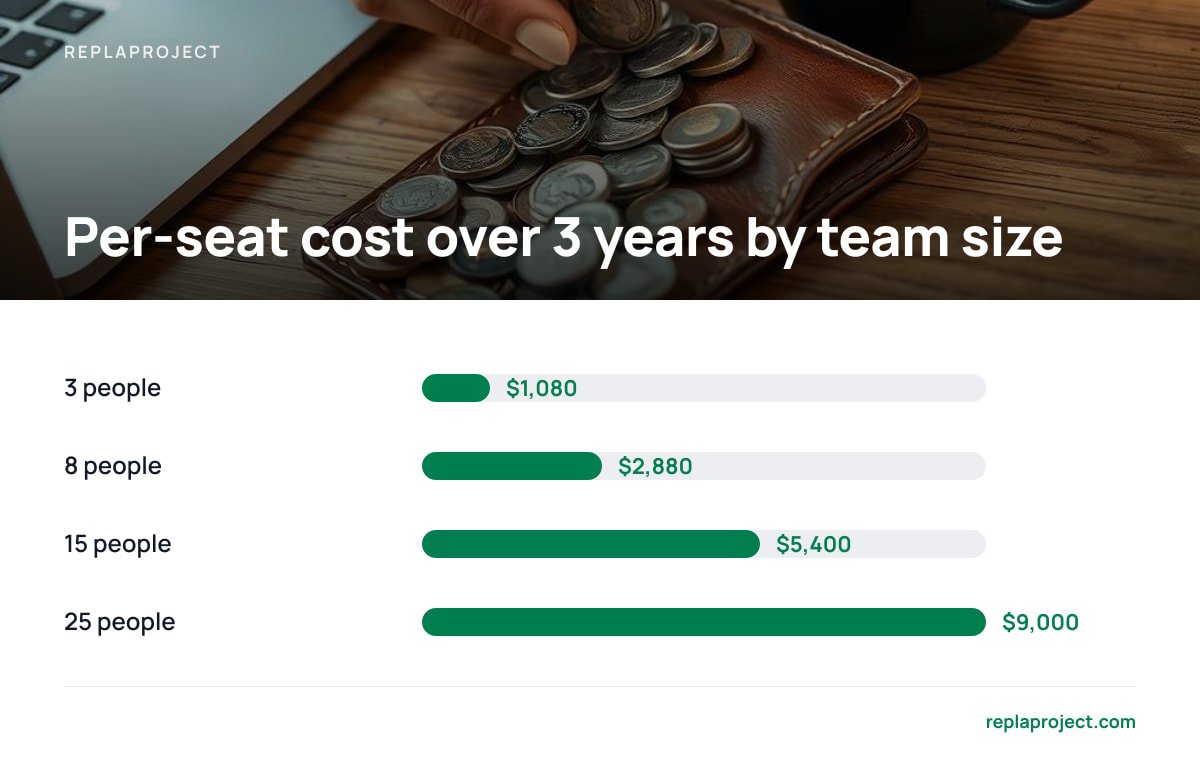
The math compounds quietly. The table below uses an illustrative rate of $10 per user per month. Plug in your own current rate, because the shape of the curve is what matters.
| Team size | Per-seat cost per year (at $10/user/month) | Per-seat cost over 3 years | Flat one-time license |
|---|---|---|---|
| 3 people | $360 | $1,080 | $399 |
| 8 people | $960 | $2,880 | $399 |
| 15 people | $1,800 | $5,400 | $399 |
| 25 people | $3,000 | $9,000 | $399 |
At $10 per person per month, a 12-person crew pays $1,440 a year, every year, for the right to move cards around.
The flat column ignores hosting, which isn't free. A small server or an existing office machine has its own costs. We break that down honestly in the break-even math by team size. Even with hosting included, the per-seat model loses for most teams past five or six people within the first year.
There's also a behavioral cost that never appears on the invoice. When every seat costs money, owners start rationing access. The subcontractor gets updates by text instead of seeing the board. The office manager asks the owner what's going on instead of looking it up. The tool meant to reduce interruptions starts generating them.
What Makes a Good Trello Replacement for Small Teams: Five Non-Negotiables
Feature comparison grids are mostly noise. A small team needs a short list of things done well, not a long list done adequately. These are the five worth insisting on.
Pricing That Doesn't Scale With Headcount
Flat fee or nothing. If adding a person costs money, you'll eventually stop adding people, and the tool stops reflecting reality. Look for a one-time license or a flat price that covers unlimited users. Read the fine print on "lifetime" deals, too. Some cap users, some cap projects, and some end support after a year. What you actually own with a lifetime license varies more than the marketing suggests.
Multiple Views of the Same Jobs
Board, table, and calendar, all from one dataset. The crew thinks in columns: to do, doing, done. The office thinks in rows: client, address, due date, invoice status. The owner thinks in weeks. A good tool shows the same jobs all three ways without making anyone maintain a separate spreadsheet. If changing a date on the calendar doesn't update the board, walk away.
A Way for Work to Arrive Without Someone Typing It
Intake beats integrations. Most tools brag about connecting to hundreds of other apps. A small team needs exactly one connection: the inbox. Covered in detail below.
Visible Blockers
Dependencies, tracked automatically. If job B can't start until job A is done, the tool should know that and show it. Covered below as well.
Low Setup Weight
Usable on day one. If the tool needs a consultant, a two-week onboarding, or a "workspace architect," it was built for a company with a project management office. Your team has a foreman and a group chat.
Where the Work Comes From: Email and Customer Requests
Here's an uncomfortable truth about board tools. The board is only as good as the cards on it, and cards don't make themselves. In most small businesses, work arrives as an email from a customer, a supplier, or a general contractor. Someone has to read it, decide it's a job, open the board, and retype it. That someone is usually busy. The job lives in their inbox until it becomes an emergency.
Email-to-task intake closes that gap. You forward the email to an address and it becomes a job, with the original message attached. No retyping, no "I'll add it later." For trades teams, this single feature does more to keep the board accurate than any amount of nagging.
A public intake form handles the other half. Customer requests come in through a form on your website and land as jobs, with the fields you actually need: address, contact, description, and photos if they have them. You stop getting "the thing at the back is broken again" with no address and no callback number.
Treat this as the real test for any replacement. Ask how a job gets onto the board when nobody is sitting at a desk. If the answer is "someone types it in," the board will drift out of date within a month.
Dependencies: The Feature Small Teams Don't Know They're Missing

Every small team has a version of this conversation. "Why hasn't the kitchen install started?" "Waiting on the cabinets." "Why are we waiting on the cabinets?" "Waiting on the deposit." "Who's chasing the deposit?" Silence.
A flat board can't answer that chain of questions. Each card sits in its column with no idea what it's waiting on. Dependency tracking links jobs together, so the tool can tell you that the install is blocked by delivery, which is blocked by an unpaid deposit. The useful version detects and surfaces these blockers automatically, rather than asking you to draw arrows by hand on a Gantt chart nobody updates.
For small teams, this matters more than it does for large ones. A 200-person company has a project manager whose job is chasing blockers. You have whoever happens to notice. A tool that answers "what's holding this up?" on its own is doing a part-time job you were never going to hire for.
Pro Tip: Before you migrate, pick your three most recent jobs that ran late and trace why. If the answer is "we were waiting on something and nobody noticed," prioritize dependency tracking over every other feature on your list. If the answer is "it never got written down," prioritize email intake instead. Your own late jobs tell you which feature you'll actually use.
Self-Hosted vs. Cloud: Who Holds the Keys, and Who Holds the Liability

Escaping monthly fees usually means one of two things: a one-time license for software you run yourself, or a cloud tool with a free tier that limits users or features. We've mapped what actually exists without monthly fees. The trade-off comes down to control versus chores.
Self-hosting gives you control. Your job data, which includes customer names, addresses, and phone numbers, stays on a machine you own. No vendor can raise prices, change terms, or sunset the product out from under you.
Self-hosting also gives you chores. You're responsible for backups, updates, and access. The U.S. Small Business Administration's cybersecurity guidance is blunt that small businesses are attractive targets precisely because they tend to have fewer security resources. It recommends basics like regular backups, software updates, and strong access controls. None of that is optional when the server is yours.
A useful checklist is the NIST Cybersecurity Framework 2.0, which is free and written to scale down to small organizations.
NIST CSF 2.0 boils security down to six functions: Govern, Identify, Protect, Detect, Respond, Recover. For a self-hosted board, "Recover" means one question: if this machine dies tonight, where is yesterday's backup?
Data protection law follows the data, not the pricing model. If you hold personal data about people in the EU, the European Commission's data protection rules under the GDPR apply either way. With a cloud vendor, you need a data processing agreement and you're trusting their controls. Self-hosted, you skip the processor relationship but own the safeguards directly. UK businesses will find practical, plain-English material from the Information Commissioner's Office.
Our position: for a team of five or more that already has someone comfortable running an office machine or a small server, self-hosting wins on cost and control. For a two-person outfit with no technical help at all, the chores may not be worth it yet.
How to Switch Without Losing a Week
Migrations fail when they try to move everything. Don't.
- Export, then archive. Export your current boards as CSV or JSON for the record. Don't try to import years of finished cards. Nobody will look at them, and they clutter the new tool.
- Move only open jobs. Most small teams have 20 to 60 active jobs at any time. Re-entering those by hand, or importing just that slice, takes an afternoon.
- Set up intake first. Point your intake email address and customer form at the new tool before anything else. New work landing in the new place is what makes people stop checking the old one.
- Run both for one week, then cut off. Make the old board read-only after seven days. A soft deadline becomes no deadline.
- Add everyone. This is the whole point. Invite the subcontractors, the bookkeeper, and the part-timer. If your old tool's pricing made you ration access, end that on day one.
If you're still weighing the money side, buying project management software outright walks through the full cost, including hosting and your own time.
Get Unlimited People on One Board for a Single $399 Payment
ReplaProject is built for exactly the problem above: small teams paying monthly per head for a board they'd happily share with everyone if it didn't cost extra. It's a one-time $399 purchase with no per-seat charges. You get board, table, and calendar views of every job across every project. Forwarded emails become jobs, and a public intake form turns customer requests into jobs too. Dependencies are detected automatically, so you can see what's holding a job up without asking around. An optional AI assistant, also available as an MCP server, suggests jobs from incoming work, and nothing gets added until a human approves it.
The honest caveat: it's self-hosted. You'll need a machine to run it on, and backups and updates are your responsibility, just as the SBA and NIST guidance above describes. Check the system requirements on our spec sheet before you buy, the same way you should check anyone's.
Frequently Asked Questions
What is a good Trello replacement for small teams on a budget?
Look for a tool with flat pricing that covers unlimited users, either a one-time license or a fixed fee. For teams of five or more, a one-time license usually costs less than a year of per-seat billing. Budget for hosting if the tool is self-hosted.
Is self-hosted project management software safe for a small business?
It can be, as long as you handle the basics yourself: regular backups, prompt updates, and controlled access. Free resources like the NIST Cybersecurity Framework 2.0 and the U.S. Small Business Administration's cybersecurity guidance cover what a small team needs. If nobody on your team can take on those tasks, a cloud tool may suit you better for now.
Do small teams really need dependency tracking?
Usually more than large teams do, because small teams rarely have a dedicated project manager chasing blockers. Dependency tracking shows that one job is waiting on another, so delays surface before a customer calls. If your late jobs often trace back to "we were waiting on something," it's worth prioritizing.
How long does it take to switch board tools?
For most small teams, a weekend plus one week of overlap is enough. Move only open jobs, set up email and form intake first, and make the old board read-only after seven days. Skip importing years of finished cards, because nobody will use them.
What does email-to-task intake actually do?
You forward an email to a dedicated address and it becomes a job on your board, usually with the original message attached. It removes the retyping step, which is where most small-business jobs get lost. It matters most for teams whose work arrives from customers, suppliers, or contractors by email.
Sources
- Strengthen Your Cybersecurity | U.S. Small Business Administration
- Cybersecurity Framework | National Institute of Standards and Technology
- Data Protection | European Commission
- For Organisations | Information Commissioner's Office