

If your work management tool feels too expensive, a cheaper per-seat plan won't fix it. The real problem is that every new hire, subcontractor, and seasonal helper adds a line to a bill that never ends. The alternative that actually changes the math is software priced per business, not per person, ideally bought once and run on your own server.
TL;DR:
- Per-seat pricing punishes growth: the bill rises every time you add a person, even someone who logs in twice a month.
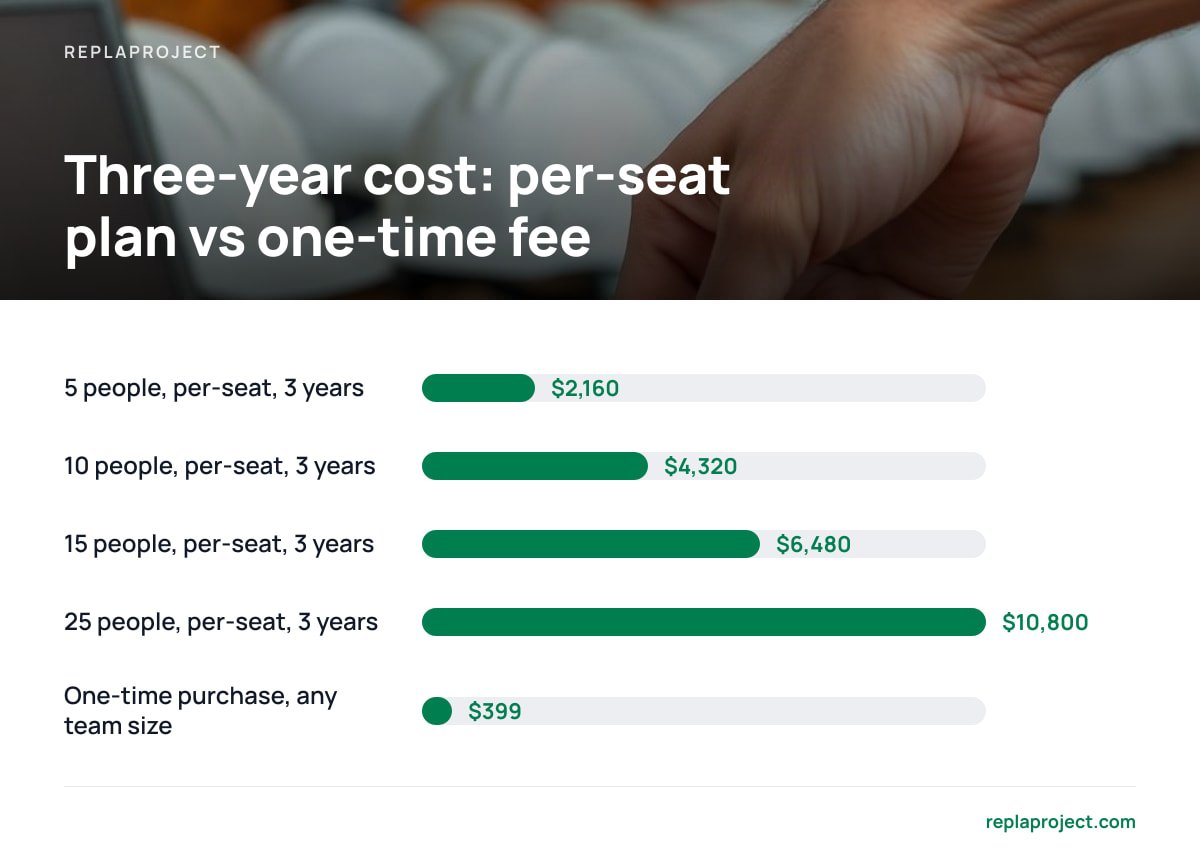
- At a hypothetical $12 per seat per month, a 10-person team pays $1,440 a year. A $399 one-time purchase is paid back in under four months.
- Your four real options are a cheaper per-seat plan, a free tier, open-source self-hosting, or a one-time-purchase tool. For most small trades and office teams, the last one is the pick.
- Self-hosting trades a monthly bill for a small job: backups, updates, and basic security. That's manageable, but it is a real task.
- Switching takes a day if you move active jobs only and leave the archive behind.
Table of Contents
- Why Your Work Management Tool Is Too Expensive: The Per-Seat Trap
- The Break-Even Math: When a Flat Fee Beats a Monthly Seat Bill
- Four Alternatives to a Per-Seat Plan, and the One We'd Pick
- What a Small Crew Needs From a Project Tool (and What It Doesn't)
- The Catch With Self-Hosting, and How to Keep It Safe
- How to Switch in a Day Without Losing Your Active Jobs
- Stop Paying Per Head: Get Your Whole Crew on ReplaProject for a Flat $399
- Frequently Asked Questions
- Sources
Why Your Work Management Tool Is Too Expensive: The Per-Seat Trap

Per-seat pricing looks cheap on the pricing page because the page shows one person. You are not one person. You are an owner, an office manager, three crew leads, a bookkeeper who needs to see due dates, and a subcontractor you'd like to add for one job.
Here is how the bill creeps:
- Everyone who looks counts. A foreman who opens the board for ten seconds a day costs the same as the person who lives in it. Most tools bill for access, not usage.
- Tiers gate the useful parts. The entry plan usually leaves out the features you were shopping for: dependencies, timelines, reporting. The plan that has them costs more per seat.
- Annual billing hides the total. Twelve dollars a month feels like nothing. Twelve dollars times 15 people times 12 months does not.
- Leaving gets harder every month. The longer your jobs live in someone else's database, the more the vendor can raise the price without losing you.
If you've been Googling a cheaper way out, you're not being stingy. You're doing arithmetic that the pricing page was designed to keep you from doing. We've covered the same pattern for board-style tools in our guide to a Trello alternative with unlimited users.
The Break-Even Math: When a Flat Fee Beats a Monthly Seat Bill
Run your own numbers, but here is the shape of it. The table assumes a hypothetical $12 per seat per month, which is a plausible mid-tier price. Swap in your actual figure.
| Team size | Per-seat cost, 1 year | Per-seat cost, 3 years | One-time $399 |
|---|---|---|---|
| 5 people | $720 | $2,160 | $399 |
| 10 people | $1,440 | $4,320 | $399 |
| 15 people | $2,160 | $6,480 | $399 |
| 25 people | $3,600 | $10,800 | $399 |
At 25 seats and $12 each, you pay $300 a month. A $399 flat fee is paid back in about six weeks.
The crossover comes earlier than most owners expect, and it comes earlier the more people you add. That's the point: a flat fee rewards growth, and a per-seat plan taxes it. For a deeper breakdown by headcount, see our flat fee vs per-seat pricing break-even math, and for the buying side, what it costs to buy project management software outright.
One tax note. In the U.S., the IRS lists off-the-shelf computer software among property that can qualify for the Section 179 deduction in IRS Publication 946. A subscription is typically just an operating expense. Whether a one-time purchase qualifies for you depends on your situation, so ask your accountant before you count on it.
Four Alternatives to a Per-Seat Plan, and the One We'd Pick
You have four realistic exits. Here is each one without the sales gloss.
A cheaper per-seat plan
You stay in the same model with a smaller number. It's the least disruptive option and the least effective. The bill still scales with your headcount, and the cheap tier is cheap because it leaves out what you needed. We would not pick this unless you have three people and plan to stay at three.
A free tier
Free tiers work for a solo operator or a tiny team with simple lists. They cap users, projects, or views, and the cap lands right when you start depending on the tool. Free is a trial with no end date and a surprise at the end of it.
Open-source, self-hosted
No license fee, full control, and a real time cost. Someone has to install it, patch it, and fix it when an update breaks something. If you have a technical person who enjoys that, it's a good option. If you don't, the "free" part gets expensive in evenings.
A one-time-purchase, self-hosted tool
You pay once, run it on your own server, and add as many people as you want. You get the cost profile of open source with a product built for non-technical teams. For small trades and office teams, this is the one we'd pick, and it is the logic behind our look at project management apps with no subscription. If you're wary of the word "lifetime," read what a lifetime license actually gets you first.
What a Small Crew Needs From a Project Tool (and What It Doesn't)
Most small teams use about a fifth of what enterprise tools offer. Before you compare anything, check your list against these.
- Three views of the same jobs. A board for status, a table for sorting and filtering, and a calendar for scheduling. If you can only see jobs one way, you'll keep a spreadsheet on the side.
- Email in, task out. Customers and suppliers send requests by email. If forwarding a message creates the job, nobody retypes anything.
- A public intake form. Customers submit a request without needing an account, and it lands in your queue.
- Dependency tracking that does itself. You need to know what's holding a job up. The framing that matters is "this can't start until the permit clears," and the tool should surface that without you drawing lines by hand.
- Unlimited people. Subcontractors, seasonal staff, the owner's spouse who does the books. None of them should trigger a price change.
You can skip portfolio dashboards, resource-leveling charts, and anything with "enterprise" in the feature name. If you haven't needed them in the last two years, you won't need them next month.
The Catch With Self-Hosting, and How to Keep It Safe
Self-hosting means your data sits on a server you control. That's the upside and the chore. Be honest with yourself about who does the chore.
- Backups. The U.S. Cybersecurity and Infrastructure Security Agency's #StopRansomware guidance recommends keeping backups offline and encrypted, and testing that you can restore from them. A backup you've never restored is a hope, not a backup.
- Basic hygiene. The FTC's cybersecurity guidance for small businesses covers the fundamentals: strong authentication, software updates, and limiting who can access what. Follow them on whatever server hosts your jobs.
- Customer data. If your intake form collects names and contact details from people in the EU, the GDPR may apply to you. One advantage of self-hosting is that you decide where that data lives, instead of accepting a vendor's default region.
None of this is exotic. It's a half-hour setup and a calendar reminder. But if nobody in your business will own it, say so now and pick a hosted tool instead.
How to Switch in a Day Without Losing Your Active Jobs

Don't migrate everything. Migrate what's moving.
- Export your history. Download a full export from the old tool and file it somewhere safe. This is your archive. You will rarely open it.
- List active jobs only. Anything with a deadline in the next 90 days or a customer waiting on it. Ignore the rest.
- Recreate them in the new tool. For 20 to 40 jobs, this takes a morning. Use the table view to enter them fast.
- Point your email at it. Set your team to forward customer emails into the new intake address. Put the public form on your website.
- Run both for a week. Keep the old tool read-only. When nobody opens it, cancel.
Pro Tip: Cancel the old subscription the day before your next renewal, not the day after you "finish migrating." Set a calendar reminder for it now. Annual plans usually auto-renew, and the renewal date is when most people discover they've paid for another year of software nobody opened.
Stop Paying Per Head: Get Your Whole Crew on ReplaProject for a Flat $399
If the problem is a bill that rises every time you hire, the fix is to remove the meter. ReplaProject is a self-hosted project management tool you buy once for $399. Add the whole office, every crew lead, and every subcontractor. The price stays $399. You get board, table, and calendar views of every job, email-to-task intake, a public form for customer requests, and automatic dependency detection that shows what's holding a job up.
There's also an AI assistant, available through an MCP server, that suggests jobs from your incoming work. A human approves everything it proposes, so it never quietly adds things to your schedule.
Now the limit. It's self-hosted, so someone on your side has to run the server, keep backups, and apply updates. If nobody wants that job, a hosted tool may suit you better, even at a monthly price. Check the spec sheet, ours included, for hosting requirements and what updates are covered before you buy.
Frequently Asked Questions
What is the best alternative if my project management tool is too expensive?
For small trades and office teams, a one-time-purchase, self-hosted tool usually beats a cheaper per-seat plan. It removes the per-person charge entirely, so adding people never changes your cost. If you have no one to handle hosting and backups, a hosted flat-rate plan is the next best choice.
How do I calculate whether per-seat pricing is costing me too much?
Multiply your seat price by your headcount and by 12 for the annual cost, then by 36 for three years. Compare that with the one-time price of a flat-fee tool. Include seats for occasional users like subcontractors and bookkeepers, since most tools bill them the same as daily users.
Is a free project management plan good enough for a small business?
It can be if you're a solo operator or have a very small team with simple needs. Free tiers usually cap users, projects, or views, and those limits tend to bite just when you start relying on the tool. Treat free as a trial, not a plan.
What do I take on by self-hosting project management software?
You take on backups, updates, and basic security for the server that runs it. Guidance from CISA recommends keeping encrypted backups and testing restores. It's a small recurring task, but someone has to own it.
Can I move my existing jobs without starting from scratch?
Yes. Export everything from your old tool for the archive, then recreate only your active jobs in the new one. For most small teams that's a morning's work. Run both tools side by side for a week before you cancel.
Sources
- Publication 946, How To Depreciate Property | Internal Revenue Service
- #StopRansomware | Cybersecurity and Infrastructure Security Agency (CISA)
- Cybersecurity for Small Business | Federal Trade Commission
- Regulation (EU) 2016/679 (General Data Protection Regulation) | EUR-Lex, Publications Office of the European Union