

There is no Wrike self-hosted version. Wrike runs only as a cloud service on its own infrastructure, and no plan, tier, or enterprise deal puts it on your server. The closest you can get is choosing where Wrike stores your data and, on its top tiers, controlling the encryption keys. If you need the software itself on hardware you control, you need a different tool, and choosing one well depends on whether you have anyone to run it.
TL;DR:
- Wrike is cloud-only. No plan or contract gets you an on-premise or private-server install, and there's no free self-hosted edition either.
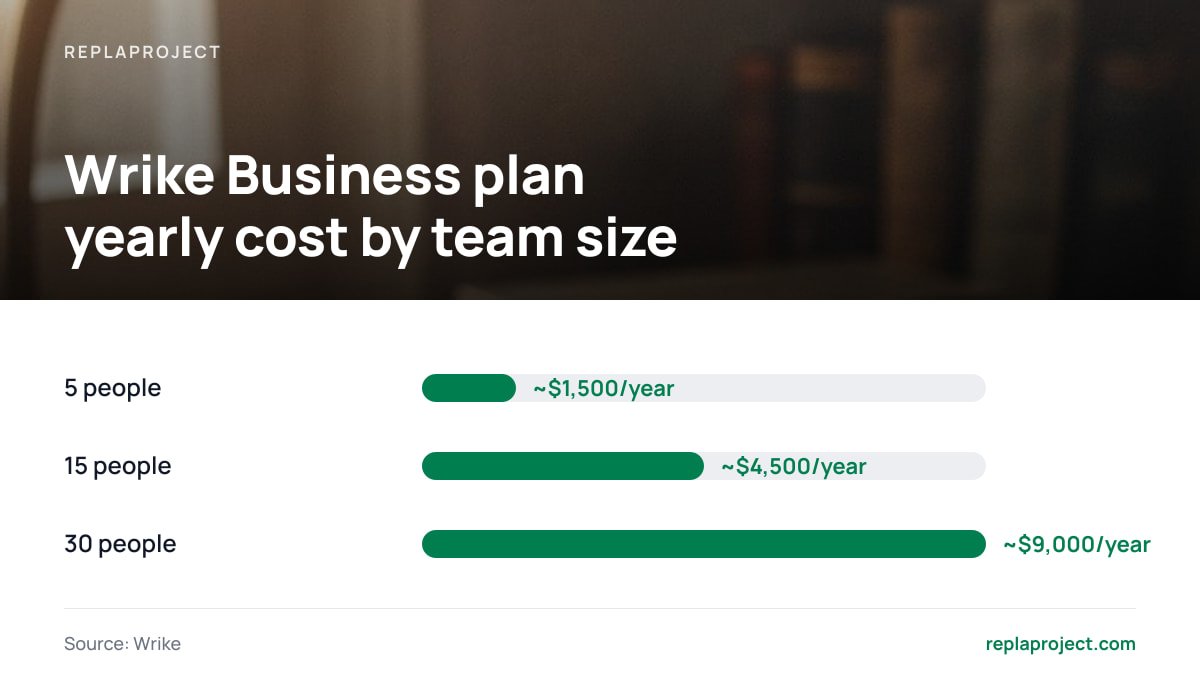
- Paid plans are billed per user. A 15-person team on the Business tier pays roughly $4,500 a year, every year.
- Citrix bought Wrike in 2021 and sold it in 2022 to the private equity firm Symphony Technology Group. Citrix no longer owns it.
- If your goal is data control, Wrike's data-residency options and audited security may cover you. If your goal is cost control, self-hosting is the stronger answer.
- Free open source tools cost nothing to license but plenty to run. Without someone to patch and back them up, they're the riskier choice.
Table of Contents
- Is There a Wrike Self-Hosted Version? No, and It Isn't Hiding Behind a Sales Call
- What Wrike Costs Per User, and What That Adds Up To Over a Year
- Does Citrix Own Wrike? It Did, Briefly
- Data Control Without Self-Hosting: Regions, Keys, and Wrike Certifications
- When Self-Hosting Is the Wrong Answer
- What's the Best Free Open Source Project Management Tool? The One You'll Actually Maintain
- Project Management Software Similar to Wrike, Sorted by Who Runs It
- Run Your Jobs Board on Your Own Server for $399, Not $4,500 a Year
- Frequently Asked Questions
- Sources
Is There a Wrike Self-Hosted Version? No, and It Isn't Hiding Behind a Sales Call
Wrike is software-as-a-service, and only that. You won't find a downloadable installer, a Docker image, or an "on-premise edition" quietly offered to enterprise buyers. Every Wrike workspace runs on infrastructure Wrike operates. You reach it through a browser, the desktop app, or the mobile apps, and all of those talk to Wrike's servers.
That also settles the "Wrike self hosted free" question. A free self-hosted edition can't exist when no self-hosted edition exists. Wrike does have a free cloud plan with limited features, aimed at small teams trying it out. It's a hosted trial-sized product, not a way to run Wrike yourself.
Third-party review sites sometimes list "deployment: cloud, SaaS, web-based" without saying plainly what's missing, and that's where the confusion starts. If a vendor's spec sheet doesn't say "on-premise" or "self-hosted," assume it isn't. In Wrike's case, it isn't.
What Wrike Costs Per User, and What That Adds Up To Over a Year

According to Wrike's pricing page, paid plans are priced per user per month and billed annually. At the time of writing, the Team plan is listed around $10 per user per month, and the Business plan is listed around $25 per user per month. Enterprise and Pinnacle tiers are quote-only. Wrike adjusts these figures from time to time, so check the page before you budget.
Per-seat pricing looks small on a pricing page and large on a bank statement. Here's what the two published tiers come to for typical small-business headcounts:
| Team size | Team plan (~$10/user/mo) | Business plan (~$25/user/mo) | Business plan over 3 years |
|---|---|---|---|
| 5 people | ~$600/year | ~$1,500/year | ~$4,500 |
| 15 people | ~$1,800/year | ~$4,500/year | ~$13,500 |
| 30 people | ~$3,600/year | ~$9,000/year | ~$27,000 |
The table assumes nobody leaves and nobody joins. In practice, headcount drifts upward. Every new hire, office temp, or site lead you want looking at the schedule adds another line to the invoice.
A 15-person team on Wrike's Business tier spends about $13,500 over three years. That money buys access, not ownership. Stop paying, and you're left with an export file.
Pro Tip: Before you leave Wrike over seat costs, audit who actually needs a full license. Wrike offers a "collaborator" user type for people who only need to view and comment, and collaborator seats don't carry the full-user price. Subcontractors and clients who check in twice a month often belong there. If that audit cuts your bill in half, you may not need to migrate at all. If it barely moves the number, you now know the per-seat model is the problem and not your setup.
Does Citrix Own Wrike? It Did, Briefly
Citrix bought Wrike in 2021 for about $2.25 billion, with plans to fold it into its digital workspace products. The arrangement was short-lived. In 2022, Citrix was itself taken private, and later that year it sold Wrike to Symphony Technology Group, a private equity firm that specializes in software companies.
So the answer to "Does Citrix own Wrike?" is no, not anymore. Wrike is a standalone company owned by private equity.
That ownership history matters more than it looks. A tool that has changed hands twice in two years can change its pricing, packaging, and roadmap on someone else's schedule. That's true of any SaaS vendor, not just Wrike. But it's the strongest argument for owning your software outright: your workflow stops depending on the next acquisition.
Data Control Without Self-Hosting: Regions, Keys, and Wrike Certifications
Many people searching "Wrike self hosted" don't care where the code runs. They care where the data sits, because a client contract, an insurer, or a regulation asks about it. Wrike has partial answers to that, and you should know them before you rule it out.
Data residency
Wrike lets customers keep their data in a US or EU data center. If your concern is the European data-protection rules summarized by the European Commission, EU residency may settle the question without any self-hosting.
Customer-controlled encryption
Wrike sells an add-on called Wrike Lock for its upper tiers. It lets you hold the encryption keys for your data, so you can revoke access. The data still lives in Wrike's cloud. You're controlling the lock, not the building.
Audited security and "Wrike certification"
Wrike's security page describes its compliance program, including ISO/IEC 27001, the international standard for information security management systems. That standard requires an outside auditor to check how a company manages security risk.
The related search "Wrike self hosted certification" usually mixes two things together. One is the vendor's security certifications, covered above. The other is Wrike's own training and admin certification courses. Neither involves self-hosting, because there's nothing to self-host.
ISO/IEC 27001 certification means an outside auditor checked the vendor's security management. A server in your back office that nobody has patched since installation has no such check.
When Self-Hosting Is the Wrong Answer
Here's the case where the obvious answer is wrong. A small business that self-hosts "for security" and has no one assigned to updates, backups, and access control is usually less secure than it was on an audited cloud service. Self-hosting moves the responsibility. It doesn't remove it.
Self-hosting is the wrong call for you if any of these apply:
- Nobody owns the server. If the honest answer to "who applies updates?" is "whoever notices," don't self-host. Unpatched web apps exposed to the internet are a common way into small-business networks.
- You have no tested backups. A backup you've never restored is a hope, not a backup. Expect to spend an afternoon setting up automated off-site copies and doing a test restore.
- Your real problem is data residency. If a client only needs your data kept in the EU, a cloud vendor with an EU region solves that more cheaply than your own server.
Self-hosting is the right call when your main pain is cost that grows with headcount, when you want ownership that survives a change in vendor ownership, or when a contract requires data on infrastructure you control. A basic virtual server typically costs $10 to $40 a month. For a team of 15 or more, that's a small fraction of the per-seat bill above.
What's the Best Free Open Source Project Management Tool? The One You'll Actually Maintain
There is no single best free open source project management tool. The license is free. Hosting, updates, backups, and the hours you spend on all three are not. The tool that rates highest in feature checklists is often the hardest for a team without IT staff to keep running.
Judge open source options on these, in this order:
- Install and upgrade path. Is there an official container image or one-command install, and do upgrades run without manual database changes? This matters more than any feature.
- Is it actually free? Several "open source" tools keep features like time tracking, Gantt charts, or single sign-on in a paid enterprise edition. Read the edition comparison before you commit.
- Fit for your kind of work. Some tools are built for software development, with sprints and story points. A trades crew scheduling site visits will fight that model every day.
- Signs of life. Look for recent releases and security fixes within the last few months. A project nobody maintains is a liability on a public server.
We compare the main contenders, including what each one's free edition leaves out, in our guide to open source, self-hosted project management. If you only need tasks and not full project planning, our breakdown of self-hosted open source task management covers the lighter options.
Our take: if you have someone technical who enjoys this kind of work, a well-maintained open source tool is a fine choice. If you don't, pay once for something designed to be simple to run. That's cheaper than paying a contractor every time an upgrade breaks.
Project Management Software Similar to Wrike, Sorted by Who Runs It

Software similar to Wrike falls into three groups. They're best compared by who hosts the tool and how you pay, because that decides your three-year cost more than any feature list does.
| Category | Who hosts it | How you pay | Best for | Main trade-off |
|---|---|---|---|---|
| Cloud work-management suites | The vendor | Per user, monthly or yearly | Larger teams that want no infrastructure work | Costs rise with every seat; vendor controls changes |
| Open source, self-hosted | You | Free license, plus your time and hosting | Teams with in-house technical skills | Maintenance is your job; some features may be paywalled |
| Commercial self-hosted | You | One-time license or annual site license | Small businesses that want ownership without per-seat fees | You still run backups and updates |
Self-hosted enterprise licenses are a category of their own. They tend to be priced for organizations with dedicated IT departments, as our analysis of what Data Center licensing really costs shows. For a 10- or 20-person business, that tier is usually overkill.
If you liked Wrike's dashboards and request forms but resent the per-seat invoice, the third row is where to look.
Run Your Jobs Board on Your Own Server for $399, Not $4,500 a Year

ReplaProject is the self-hosted option for small businesses whose real problem is the per-seat bill. You pay $399 once, install it on your own server, and add as many people as you like, including office staff, site crews, and subcontractors, without the invoice moving. Every job across every project appears in board, table, and calendar views. Forwarded emails become jobs. Customers submit requests through a public intake form. Automatic dependency detection shows what's holding each job up, and an optional AI assistant suggests jobs that a human approves before they're added.
The honest caveat: self-hosting means the server is yours, and so are the backups and updates. If nobody on your team will own that, the section above applies to us as well. Read our requirements before you buy, and make sure you have somewhere to run it.
Frequently Asked Questions
Can you self-host Wrike?
No. Wrike is a cloud-only service, and no plan or enterprise contract includes an on-premise or private-server install. You can choose a US or EU data center, but Wrike always runs the infrastructure.
How much is Wrike per user?
At the time of writing, Wrike's Team plan is listed around $10 per user per month and its Business plan around $25 per user per month, both billed annually. Enterprise and Pinnacle tiers are priced by quote. Check Wrike's pricing page for current figures, because they change.
Is there a free version of Wrike?
Wrike has a free cloud plan with limited features for small teams. There's no free self-hosted edition, because Wrike doesn't offer a self-hosted edition at all.
Does Citrix own Wrike?
No. Citrix bought Wrike in 2021 for about $2.25 billion, then sold it in 2022 to the private equity firm Symphony Technology Group. Wrike now operates as a standalone company.
What project management software is similar to Wrike?
Alternatives fall into three groups: cloud suites billed per user, free open source tools you host yourself, and commercial self-hosted tools you buy once. For small teams leaving Wrike over cost, the self-hosted groups usually come out cheapest over three years, provided someone handles backups and updates.
Is self-hosted project management more secure than Wrike?
Only if someone actually maintains it. Wrike's infrastructure is covered by audited certifications such as ISO/IEC 27001. A self-hosted server without regular patching and tested backups is usually less secure than that.
Sources
- Wrike Pricing | Wrike
- Wrike Security | Wrike
- ISO/IEC 27001 Information security management systems | International Organization for Standardization
- Data protection in the EU | European Commission
- Symphony Technology Group | STG